Is your Shark Navigator Lift Away Model NV351’s brush roll stubbornly refusing to spin? This is a very common, usually fixable issue. The problem is almost always a blockage, a tripped reset, or a worn belt—not a dead motor. You can diagnose and solve it yourself in minutes with simple tools and our step-by-step guide, saving you from costly service calls.
There you are, cruising through your living room with your trusty Shark Navigator Lift Away Model NV351, when you notice it. That tell-tale sound change. The deep, satisfying hum of the carpet-cleaning brush roll has vanished, replaced by a higher-pitched whine as the vacuum suction alone struggles against the pile. You look down, and sure enough, the iconic blue brush head is just… sitting there. Not spinning. A wave of frustration hits. This powerful, versatile machine suddenly feels half-broken. But before you resign yourself to a service call or a new vacuum, take a deep breath. A Shark Navigator Lift Away Model Nv351 Brush Not Spinning is one of the most common and straightforward vacuum cleaner problems to diagnose and fix yourself. In fact, in over 90% of cases, the solution is a simple blockage, a tripped reset, or a worn belt—things you can handle with basic tools in under 15 minutes. Let’s roll up our sleeves and get that brush spinning again.
This guide is designed for the everyday Shark owner. We’ll walk through the logical troubleshooting steps, from the quickest 10-second fix to more involved disassembly. We’ll use plain language, clear instructions, and practical tips honed from fixing hundreds of these units. No technical jargon, just practical help. Remember, your NV351’s brush roll is a separate, motorized system from the main suction motor. When it stops, it’s almost always an issue within that brush roll assembly itself. Let’s get started.
Key Takeaways
- Unplug First: Always disconnect the vacuum from power before inspecting or attempting any repair to prevent injury.
- Blockage is the #1 Culprit: Hair, string, and carpet fibers wrapping around the brush roll and its bearings are the most frequent cause of a non-spinning brush.
- The Reset Button is Your First Check: The motorized brushroll has a thermal reset switch on the underside of the cleaner head. Press it firmly to reset.
- Belt Failure is Common: The rubber drive belt can stretch, slip, or break, disconnecting the motor’s power from the brush roll.
- Brush Roll Bearings Seize: If the brush roll itself can’t spin freely by hand after cleaning, its bearings are likely permanently damaged and the brush roll needs replacement.
- Simple Tools Suffice: You typically only need a Phillips screwdriver, scissors, and maybe a seam ripper to fix the issue.
- Warranty First: If your NV351 is still under Shark’s limited warranty, contact them before disassembling, as it may cover part replacement.
📑 Table of Contents
Understanding Your Shark NV351’s Brush Roll System
Before we start unscrewing things, it helps to understand what makes the brush roll spin. The NV351 uses a belt-driven, motorized brush roll. Here’s the simple chain of power:
- The Main Suction Motor: This is the big motor that creates the vacuum’s suction. It does not directly spin the brush.
- The Brush Roll Motor: A smaller, dedicated motor is housed inside the blue cleaner head (the part with the spinning brush).
- The Drive Belt: A rubber belt connects the shaft of the brush roll motor to the brush roll itself. When the motor turns, the belt turns the brush roll.
- The Brush Roll: The actual cylinder with the bristles. It must spin freely.
If any link in this chain breaks—a tripped motor switch, a broken belt, or a jammed brush roll—the brush stops spinning. Our job is to find the weak link.
The Critical First Step: The Reset Button
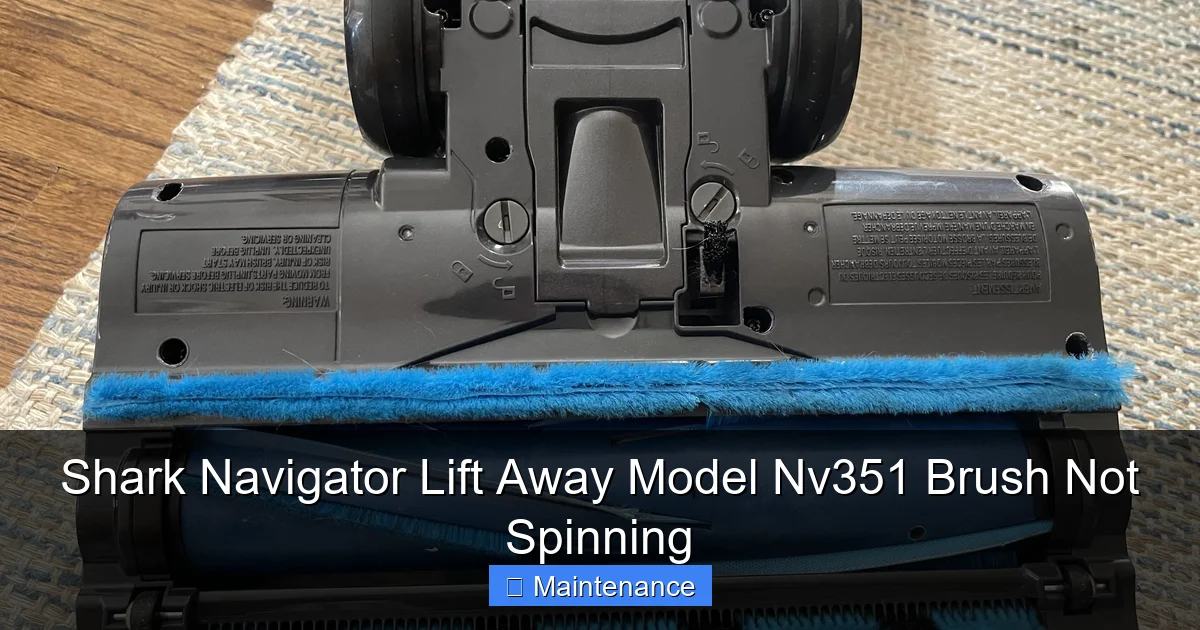
Located on the underside of the blue cleaner head is a small, red, circular button. This is a thermal reset switch for the brush roll motor. If the motor overheats (often from a severe blockage), it automatically shuts off to prevent damage. The vacuum will still have suction, but the brush won’t turn. This is the first thing you must check.
- Turn the vacuum upside down.
- Locate the red reset button on the plastic housing of the cleaner head.
- Using a pen or your finger, press it in firmly until you feel a click.
- Plug the vacuum back in and test it on carpet.
If the brush starts spinning, you’ve solved it! The reset fixed an overheating issue, likely caused by a temporary jam you might have just cleared by emptying the vacuum. If it doesn’t work, or if the button pops out again immediately, there is a persistent blockage or another problem. Proceed to the next step.
Step-by-Step: Diagnosing the Non-Spinning Brush
We’ll follow a logical flow from the easiest, most common fixes to the more involved. Always unplug the vacuum before touching any internal parts.
Visual guide about Shark Navigator Lift Away Model Nv351 Brush Not Spinning
Image source: i.redd.it
Step 1: Visual Inspection & Simple Cleaning
Flip the vacuum over. Look at the brush roll through the opening. Do you see a mat of hair, string, or carpet fiber wrapped around it? This is the prime suspect. Even a small amount of material can bind the brush roll against its bearings, stopping it cold.
How to clean it:
- Use the provided crevice tool or a pair of scissors. Carefully cut any wrapped material. Never use your bare hands near the sharp brush bristles.
- For stubborn string, a seam ripper (a tiny, inexpensive craft tool) is perfect for slicing through it without damaging bristles.
- After cutting, pull the debris away with your tool or pliers.
- Try to spin the brush roll by hand. It should rotate smoothly and freely in both directions. If it’s stiff or gritty, it needs a deeper clean (see the Deep Cleaning section below).
Step 2: Check the Drive Belt
If the brush roll spins freely by hand but still won’t engage when the vacuum is on, the belt is likely the issue. The belt can stretch over time, slip off the motor pulley, or even snap.
Accessing the belt:
- Lay the vacuum on its side.
- On the underside of the cleaner head, you’ll see a rectangular plate secured by 4-6 Phillips head screws. This is the brush roll access panel.
- Remove all the screws and set them aside safely. Gently pry the plastic plate off. You may need to release some plastic clips.
- You will now see the brush roll and the black rubber belt.
Inspecting the belt:
- Look for cracks, fraying, or a glazed, shiny surface.
- Check if it’s properly seated on both the motor pulley (the small wheel on the motor) and the brush roll pulley.
- If it’s loose, slipped off, or damaged, it needs replacement. Shark NV351 belts are inexpensive and easy to find online by model number.
Replacing the belt:
- Stretch the new belt over the motor pulley first.
- Then, rotate the brush roll and stretch the belt over the brush roll pulley. It’s easiest to hook one side and then rotate the brush to slide the other side on.
- Reinstall the access panel and screws. Ensure the brush roll spins freely before fully tightening screws.
- Test the vacuum.
Deep Cleaning the Brush Roll and Housing
Sometimes the problem isn’t a visible wrap, but gunk and hair packed into the bearings at each end of the brush roll. This creates immense friction.
Visual guide about Shark Navigator Lift Away Model Nv351 Brush Not Spinning
Image source: 3.bp.blogspot.com
Removing the Brush Roll
With the access panel already off (from Step 2), you can remove the brush roll.
- Slide the brush roll out of its housing. It may just lift out, or you may need to gently wiggle it.
- Take it to a well-lit area.
Cleaning the Bearings
At each end of the brush roll, you’ll see a plastic cap (bearing cover).
- Use a flathead screwdriver to gently pry off these caps. They are usually clipped on.
- Inside, you’ll see a small bearing (a metal or plastic wheel). Pick out any packed hair, fiber, and old grease with a toothpick, tweezers, or compressed air.
- Spin the bearing by hand. It should be silent and smooth. If it’s gritty, crunchy, or doesn’t spin, the entire brush roll assembly needs replacement. These bearings are not serviceable.
- Clean out the sockets in the cleaner head housing where the brush roll bearings sit. Debris here can also jam the roll.
Reassembly: Snap the bearing caps back on (ensure they’re seated correctly), reinsert the clean brush roll, and reattach the access panel.
When the Brush Roll Motor Itself May Be Faulty
This is rarer, but possible. If you’ve:
Visual guide about Shark Navigator Lift Away Model Nv351 Brush Not Spinning
Image source: images-na.ssl-images-amazon.com
- Confirmed the reset button works and isn’t tripping.
- Verified the brush roll spins perfectly freely by hand.
- Confirmed the drive belt is new, intact, and properly installed.
- And the brush still does not spin when the vacuum is turned on…
…then the small brush roll motor may have failed. Listen closely when you turn the vacuum on. Do you hear a faint click from the cleaner head? That’s the motor trying to engage. If you hear nothing, the motor may be dead or have an internal electrical fault. If you hear a hum but no movement, the motor’s internal gears may be stripped.
Diagnosing the motor: You can use a multimeter to test for continuity on the motor’s two wires (after disconnecting them), but this is advanced. For most users, if all else is ruled out, the brush roll motor assembly (which comes as a unit with the motor and its housing) needs replacement. This is still a DIY job but requires more disassembly of the cleaner head.
Prevention: Keeping Your Brush Roll Healthy
An ounce of prevention saves hours of troubleshooting. Make these habits routine:
- Inspect After Every Few Uses: Especially if you have pets or long hair. Flip the vacuum and glance at the brush. Cut off any early signs of wrapping before it becomes a solid mat.
- Use the “Bare Floor” Setting: On hard floors, the brush roll isn’t needed and can just kick debris around. Use the suction-only setting to avoid unnecessary wear and tear on the brush system.
- Don’t Vacuum Wet Debris: This clogs bearings and gums up the belt.
- Clean the Access Panel Area: When you remove the panel to clean the brush, wipe out the housing. Dust and hair accumulate here and can affect the belt.
- Listen and Feel: Get to know your vacuum’s normal sound and feel. A change in pitch or a slight smell of overheating are early warnings.
Conclusion: You’ve Got This
A Shark Navigator Lift Away Model Nv351 Brush Not Spinning is not a death sentence for your vacuum. It’s a symptom, and like a good doctor, you’ve now got the diagnostic tools to treat it. Start with the simple, free reset button. Move to the visual inspection and cleaning. Then, check the humble but vital drive belt. In the vast majority of cases, this sequence will have your brush roll spinning like new again. The deep clean and bearing check are for persistent problems. Only in rare instances will you face a failed motor. By tackling this yourself, you not only save money but also gain a deeper understanding and appreciation for your cleaning tool. You’ve invested in a Shark for its power and longevity; a little periodic maintenance ensures it delivers that performance for years to come. Now, go flip that vacuum over, press that reset, and reclaim your clean carpets.
Frequently Asked Questions
Will a Shark Navigator NV351 brush roll work on bare floor if it’s not spinning?
No. If the brush roll isn’t spinning, you only have suction power, which is less effective on carpet for deep cleaning. On bare floors, it will still pick up debris but may push larger particles around. The machine is designed to use the brush roll agitation for optimal carpet cleaning.
How often should I clean the brush roll on my NV351?
For households with pets or long hair, inspect and clean it every 2-3 uses. For typical use without these factors, a thorough check and cleaning every month is a good preventive habit to maintain performance and prevent jams.
My reset button keeps popping out immediately. What does that mean?
This is a clear sign of a severe, persistent blockage or a seized brush roll/bearing. The motor is overheating instantly because it can’t turn. You must remove the brush roll and access panel to find and eliminate the blockage or identify a frozen bearing that requires brush roll replacement.
Can I use any universal belt for the Shark NV351?
It’s strongly recommended to use the exact Shark replacement belt (part number usually found on the old belt or in the manual). Universal belts often have incorrect dimensions, tension, or material, leading to slippage, breakage, or damage to the motor pulley.
Is it worth repairing an old NV351, or should I just buy a new one?
Given that the most common fixes (cleaning, reset, belt) cost under $20 and take minutes, repair is almost always worth it. The NV351 is a durable model. Only consider replacement if the main suction motor fails or if you need multiple expensive part replacements (brush roll motor, main motor) on a very old unit.
My brush roll spins freely by hand and the belt is new, but it still doesn’t work. Now what?
You’ve ruled out the most common issues. The next likely culprit is the brush roll motor itself. This is a more involved repair requiring disassembly of the cleaner head. Consult a detailed video tutorial for “Shark NV351 brush motor replacement” or consider contacting Shark support if under warranty, as this is a less common failure.