Turning off the vent fan on your GE microwave is usually a simple button press, but it can get stuck due to auto-settings, errors, or a faulty thermostat. This guide covers every method, from using the dedicated “Vent” button to resetting the microwave’s internal computer. We explain the difference between the vent fan and the hood fan, troubleshoot common issues like a fan that won’t stop running, and provide clear safety precautions. Understanding your microwave’s venting modes is key to regaining control.
That gentle hum you hear after cooking isn’t just the microwave cooling down—it’s your vent fan, working to pull steam, smoke, and cooking odors out of your kitchen. It’s a fantastic feature, until it decides not to turn off. A continuously running GE microwave vent fan is more than a nuisance; it’s a wasted energy drain and a constant source of irritating noise. If you’re standing in your kitchen wondering, “How do I turn off the vent fan on my GE microwave?” you’re not alone. This is one of the most common queries we receive. The solution ranges from a simple, one-second button press to a more involved diagnostic process. This comprehensive guide will walk you through every possible method, from the simplest user operation to advanced troubleshooting, so you can silence that fan for good.
First, let’s clarify terminology, as GE uses a few different names. The fan that exhausts air to the outside (if you have a vented installation) or recirculates it through a filter (in non-vented models) is consistently called the “Vent Fan” or “Exhaust Fan” on the control panel. Some over-the-range (OTR) models also have a separate “Hood Fan” that can operate independently of the microwave itself. For the purpose of this article, we are focusing on the fan integrated with the microwave’s cooking cavity that activates during and after microwave use. Now, let’s get that fan under control.
Key Takeaways
- Primary Control: The dedicated “Vent” or “Fan” button on the control panel is the standard way to manually turn the vent fan on and off on most GE models.
- Auto-Vent Feature: Many GE microwaves have an automatic vent setting that runs the fan for a set time after cooking or when the internal temperature rises; this must often be disabled in the settings menu.
- Reset is Key: A simple power reset by unplugging the microwave or turning off the circuit breaker for 5 minutes can clear temporary glitches causing the fan to run continuously.
- Safety First: Always ensure the microwave is unplugged before attempting any internal inspection or component testing to avoid electric shock.
- Thermostat & Thermistor: A faulty temperature sensor (thermistor) or vent thermostat is a common internal cause for a fan that won’t turn off, requiring part replacement.
- Model Variations: Control layouts differ between GE Profile, Cafe, and standard GE models; consult your specific user manual for exact button functions and menu paths.
- When to Call a Pro: If basic resets and setting checks fail, the issue is likely a failed electronic control board or motor, requiring a qualified appliance repair technician.
📑 Table of Contents
- Understanding Your GE Microwave’s Venting System
- Method 1: The Direct Approach – Using the Control Panel
- Method 2: Disabling the Automatic Vent Feature
- Method 3: The Universal Reset – Power Cycling the Microwave
- Method 4: Advanced Troubleshooting – Internal Components
- Method 5: When to Call a Professional & Final Thoughts
- Conclusion: Regaining Control of Your Kitchen Environment
Understanding Your GE Microwave’s Venting System
Before we start pressing buttons, it’s crucial to understand *why* the fan is running. GE microwaves, especially over-the-range models, have sophisticated venting logic designed to protect the appliance and your kitchen. The fan isn’t just a manual switch; it’s often tied to temperature sensors and automatic timers.
The Two Main Venting Modes: Manual vs. Auto
Your GE microwave likely operates in one of two primary modes, or a combination thereof:
- Manual Vent Mode: You press the Vent button (sometimes depicted by a fan icon) to turn the fan on. Pressing it again should turn it off. This gives you direct, immediate control.
- Auto/Intelli-Vent Mode: This is the “set it and forget it” feature. When enabled, the microwave automatically turns the vent fan on at a low or high speed during cooking. More importantly, it often continues running the fan for a predetermined period (usually 5-15 minutes) after the cooking cycle ends to clear residual steam and heat from the cavity and the vent ductwork. This is the most common culprit for a fan that seems “stuck” on long after you’ve finished cooking.
Many users are unaware this auto-timer is active. The fan isn’t broken; it’s just following its programming. Your first task is to identify and potentially disable this auto-vent feature.
The Role of Temperature Sensors
Nestled within the microwave’s vent housing or near the magnetron is a small component called a thermistor (temperature sensor) or a vent thermostat. Its job is to monitor the internal temperature of the microwave and the vent exhaust. If the temperature exceeds a safe threshold—which can happen during long, high-power cooking sessions or if the vent is blocked—this sensor signals the control board to turn the vent fan on, and it will keep it on until the temperature drops to a safe level. If this sensor fails in a “closed” position (stuck on), it will tell the computer the microwave is overheating, causing the fan to run indefinitely, even when the unit is cold. This is a classic failure point.
Method 1: The Direct Approach – Using the Control Panel
This is your starting point for 90% of “fan won’t turn off” situations. We’re going to assume the fan is currently running and you want it to stop now.
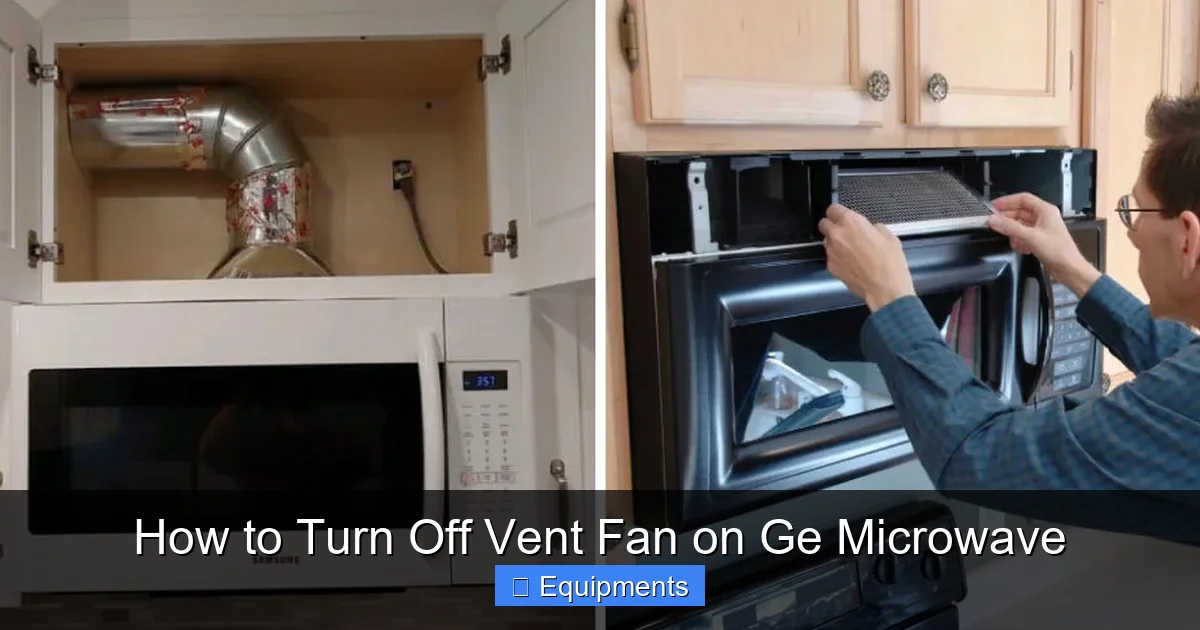
Visual guide about How to Turn Off Vent Fan on Ge Microwave
Image source: thekitchenix.com
Locating the Vent Button
On most GE microwave control panels, you will find a button labeled Vent, Fan, or with a simple fan icon. It’s often located near the other cooking function buttons (like Popcorn, Beverage, etc.) or near the timer/clock display. On some newer touch panel models, you may need to access a “Vent” or “Options” menu on the screen.
The Simple Press and Hold Technique
Here’s the standard procedure:
- Ensure the microwave is not actively cooking (the display should show the time or be blank).
- Press the Vent button firmly once. On many models, this toggles the fan between Low, High, and Off. You may see a fan icon or “Lo”/“Hi” appear on the display.
- If pressing once doesn’t turn it off, press it repeatedly until you cycle through all settings and it turns off.
- On some models, you must press and hold the Vent button for 2-3 seconds to turn it off. The display may flash or change to indicate the fan is stopping.
Pro Tip: If the fan is on due to the auto-vent timer, pressing the Vent button during that post-cooking cycle will usually cancel the timer and turn the fan off immediately. This is the quickest fix if you know the feature is enabled.
Method 2: Disabling the Automatic Vent Feature
If the fan keeps turning on by itself after every cooking session, you need to dive into the settings menu to turn off the auto-vent function. The path varies slightly by model series.
Navigating the Settings Menu
For models with a digital display and menu buttons (often labeled Options, Settings, or a gear icon):
- Press the Options or Settings button.
- Use the number pad or scroll arrows to navigate to a setting called Vent, Auto Vent, Vent Fan, or Exhaust.
- Press Enter or Start to select it.
- You should see options like On, Off, or timing options (e.g., 5 Min, 10 Min). Select Off.
- Press Options/Settings again to exit and save.
For models with a dedicated Vent button that has a separate Auto indicator light: Look for a small light next to the Vent button that says “Auto.” If this light is illuminated, the auto-vent is on. Press and hold the Vent button for several seconds until the “Auto” light turns off. The manual fan control will remain functional.
Consulting the User Manual
If you cannot find these settings, your specific model’s user manual is the ultimate authority. You can usually find a digital PDF on the GE Appliances website by entering your exact model number (found on the door frame or back of the unit). Search the manual for “vent,” “exhaust,” or “auto fan.”
Method 3: The Universal Reset – Power Cycling the Microwave
When software glitches or temporary sensor errors occur, a full power reset is the equivalent of turning it off and on again. This clears the microwave’s volatile memory and resets all control boards.

Visual guide about How to Turn Off Vent Fan on Ge Microwave
Image source: thekitchenix.com
Step-by-Step Power Reset
This is safe and non-invasive.
- Unplug the microwave from the wall outlet. If it’s hardwired, you must turn off the dedicated circuit breaker in your home’s electrical panel. Safety Note: Ensure you are turning off the correct breaker. If unsure, consult an electrician.
- Leave the microwave unplugged or with the breaker off for a full 5 minutes. This ensures all residual power drains from the capacitors.
- Plug the microwave back in (or turn the breaker back on).
- The clock will likely need to be reset. Do this first.
- Test the vent fan. Press the Vent button. The auto-vent timer should be cleared, and the fan should now respond normally to manual control.
Why this works: The microwave’s main electronic control board (the “brain”) has a small amount of memory. A glitch can cause it to think the vent is still in an auto-cycle or that a temperature sensor is active. A hard reset clears this false state.
Method 4: Advanced Troubleshooting – Internal Components
Warning: The following steps involve accessing the microwave’s internal components. MICROWAVES CONTAIN HIGH-VOLTAGE CAPACITORS THAT CAN RETAIN A LETHAL CHARGE EVEN WHEN UNPLUGGED. Unless you are a trained appliance technician with experience in high-voltage electronics, DO NOT ATTEMPT these steps. The risk of severe electric shock is extremely high. This section is for informational purposes only to help you diagnose the problem before calling a pro.

Visual guide about How to Turn Off Vent Fan on Ge Microwave
Image source: thekitchenix.com
Checking the Vent Thermostat / Thermistor
If the fan runs constantly and does not respond to resets or button presses, a failed temperature sensor is a prime suspect. This is a small, round, silver or copper-colored disc, usually located on the vent housing inside the microwave cabinet (the part you see when you open the door and look up at the top).
- Access: You must remove the microwave’s outer cabinet. This typically involves unscrewing the back panel and sometimes the top/side grilles. This is complex and model-specific.
- Test: With the microwave unplugged, disconnect the wires from the thermostat/thermistor. Using a multimeter set to ohms (Ω), test for continuity. At room temperature, it should show a low resistance (e.g., 1kΩ to 10kΩ). If it shows open circuit (infinite resistance) or zero resistance (short), it is faulty and must be replaced.
Inspecting the Vent Fan Motor & Assembly
Less common, but possible, is a mechanically seized or electrically shorted fan motor. The motor is attached to the fan blade assembly inside the vent duct.
- Access: Same as above; you need to remove the inner vent housing or shroud to see the fan.
- Inspection: Manually try to spin the fan blade. It should rotate freely with minimal resistance. If it’s gritty, stuck, or won’t move, the motor bearings are likely shot, or something is jammed in the vent (like a piece of paper or grease buildup).
- Test: The motor can be tested for continuity (should be a low resistance reading, e.g., 20-100Ω) and for shorts to ground (infinite resistance between motor terminals and the metal housing). Any reading other than expected indicates a bad motor.
Method 5: When to Call a Professional & Final Thoughts
If you have diligently worked through Methods 1, 2, and 3 (button press, disable auto-vent, full power reset) and the vent fan on your GE microwave still runs non-stop, the problem is almost certainly an internal component failure. At this stage, the likely culprits are:
- A failed thermostat or thermistor (most common).
- A failed vent fan motor.
- A malfunctioning main electronic control board that is stuck in a “vent on” state.
Making the Repair Decision
Replacing a thermostat or fan motor on a GE microwave typically costs $50-$150 in parts, plus labor if you hire a technician. Given that a new comparable over-the-range microwave can cost $300-$600, repair is often economical, especially on models less than 5-7 years old. However, if the control board is faulty, the part alone can cost $200-$400, making replacement a more sensible option for older units.
Your best course of action at this point is to call a certified appliance repair service. Explain the symptoms: “My GE microwave’s vent fan runs continuously and does not turn off with the Vent button or after a power reset.” This tells the technician you’ve done basic troubleshooting, saving them time and you money. They will have the tools (like a high-voltage discharge probe for safety) and diagnostic expertise to pinpoint and replace the faulty part quickly and safely.
Conclusion: Regaining Control of Your Kitchen Environment
Dealing with a GE microwave vent fan that refuses to shut off can be frustrating, but it’s a problem with a clear diagnostic path. Start with the simplest solutions: press the Vent button to cancel any auto-cycle, and then disable the Auto-Vent feature in the settings menu to prevent it from happening again. If that fails, perform a complete 5-minute power reset. These three steps resolve the vast majority of cases, which are simply software or setting-related quirks.
Only when these user-level fixes fail should you consider the more serious internal failures of thermostats, motors, or control boards. Remember the paramount rule of appliance repair: safety first. The internal components of a microwave are not for DIY tinkering unless you have specific training. By understanding your microwave’s venting logic and following this structured approach, you can efficiently solve the problem, stop the noise, and restore peace to your kitchen. You now have the knowledge to turn off that vent fan for good.
Frequently Asked Questions
Why does my GE microwave vent fan run for so long after cooking?
This is almost certainly the Auto-Vent feature, which is designed to clear residual steam and heat from the vent duct. It typically runs for 5-15 minutes after a cooking cycle. You can disable this feature in the microwave’s settings menu to prevent it from happening.
My GE microwave vent button doesn’t seem to work—the fan keeps running. What now?
First, try pressing and holding the Vent button for 3-5 seconds. If that fails, perform a full power reset by unplugging the microwave for 5 minutes. If the fan still runs constantly after the reset, an internal component like the thermostat or control board has likely failed and needs professional service.
Is the vent fan the same as the hood fan on my over-the-range GE microwave?
No. The vent fan is integrated with the microwave and activates during/after microwave cooking. The hood fan is a separate two-speed fan (Low/High) on the underside of the unit that you can turn on manually at any time to vent cooktop fumes, independent of microwave use. They often share the same exhaust duct but are controlled separately.
Can I clean the vent fan to make it work better or stop it from running?
You can and should clean the exterior grease filters (usually metal mesh filters that slide out from the bottom) monthly, as a clogged filter can cause the auto-vent to run longer. However, cleaning will not fix a fan that is stuck “on” due to an electrical or sensor fault. The internal fan blade inside the duct can accumulate grease over years, but accessing it for cleaning requires disassembly.
My GE microwave’s vent fan runs but is very weak. Is that related to the “won’t turn off” problem?
A weak vent fan is usually caused by clogged grease filters or a heavy buildup of grease and dust inside the vent duct and on the fan blades. It is a separate issue from a fan that won’t turn off. Clean your filters first. If airflow remains poor, the ductwork may need a deep professional cleaning, or the fan motor may be weakening.
Where is the auto-vent setting on my GE Profile microwave?
On most GE Profile models with a touchscreen or digital display, press Options or Settings. Navigate to a submenu called Vent, Exhaust, or Cooktop Vent. You should see an option for Auto Vent with a toggle to turn it On or Off. Select Off and exit the menu. The exact path varies; consult your manual for your specific model number (e.g., JVM3160, PVM9179).