You can safely turn off your Samsung refrigerator’s cooling system without unplugging it by using the built-in control panel. This method stops the compressor and fans while keeping the appliance powered, preserving your temperature settings, ice production, and avoiding the disruptive reset that unplugging causes. Never simply unplug the unit to “turn it off,” as this can lead to food spoilage, error codes, and potential compressor damage. For extended periods like vacations, use the dedicated “Vacation” or “Sabbath” mode if available.
Have you ever needed to silence your refrigerator for a few hours, move it, or perform a deep clean, but the thought of unplugging it gave you pause? You worry about resetting the clock, losing your carefully set temperatures, or watching the ice maker go through a lengthy reset cycle. You’re not alone. Many Samsung refrigerator owners face this exact dilemma. The good news is that you absolutely can turn off your Samsung refrigerator’s cooling system without unplugging it from the wall outlet. It’s a simple process once you know where to look and what to do. This guide will walk you through every safe, manufacturer-approved method, explain why unplugging is a bad idea, and give you the confidence to manage your appliance properly.
Think of your Samsung refrigerator not just as a cold box, but as a sophisticated computer-controlled climate system. The power cord supplies electricity to the entire brain—the control board, display, lights, and of course, the compressor and fans that make cold air. Unplugging it is like yanking the battery out of your laptop while it’s on; it causes a hard shutdown. Using the built-in controls is like using the “Shut Down” function on your computer—it’s a graceful exit that protects the system. Our goal here is to achieve that graceful shutdown for your fridge, keeping its memory intact and its components safe.
Key Takeaways
- Use the Control Panel: The primary and safest method to disable cooling is through the refrigerator’s digital or mechanical control panel, not by unplugging the power cord.
- Avoid Unplugging: Unplugging resets all electronic settings, can trigger error codes, and may cause the compressor to struggle or fail when power is restored.
- Understand “Off” Modes: Samsung fridges often have a “Vacation,” “Sabbath,” or “Power Save” mode that disables cooling while keeping lights and displays active for short-term use.
- Defrost Cycle is Normal: If your fridge stops cooling temporarily, it may be in an automatic defrost cycle—this is a normal, programmed function, not a manual “off” switch.
- Food Safety is Paramount: Before disabling cooling for any reason, consume, preserve, or relocate perishable food. A turned-off fridge will warm to room temperature within hours.
- Not All Models Are Identical: Button layouts and menu options vary by model year and series (e.g., Family Hub, Bespoke, Classic). Consult your specific user manual for exact instructions.
- Troubleshooting First: If you’re turning the fridge off to address a problem (noise, frost), explore diagnostic or service modes on the panel before a full shutdown.
📑 Table of Contents
- Why You Should Never “Turn Off” a Samsung Fridge by Unplugging It
- The Primary Method: Using the Control Panel to Disable Cooling
- Specialized Off Modes: Vacation, Sabbath, and Defrost
- What To Do After You’ve Turned Cooling Off
- Troubleshooting: What If the Control Panel Method Doesn’t Work?
- Conclusion: Control, Not Chaos
Why You Should Never “Turn Off” a Samsung Fridge by Unplugging It
Before we dive into the “how,” let’s solidify the “why not.” The instinct to simply pull the plug is strong, but it’s the wrong approach for modern, computerized refrigerators. Here’s what happens when you unplug a Samsung fridge:
The Great Reset: Lost Settings and Long Wait Times
When power is cut, the refrigerator’s control board loses all volatile memory. This means your set temperatures for the fridge and freezer compartments revert to factory defaults. The ice maker will think it’s a brand-new appliance and will go through its entire fill-freeze-eject cycle, which can take 6-12 hours before you get a single cube. Any special settings, like Quick Freeze or internal door lock codes, are erased. You’ll have to manually reprogram everything once power is restored.
Error Codes and Diagnostic Confusion
Samsung refrigerators have sophisticated self-diagnostic systems. A sudden, unexpected power loss is logged as an abnormal event. When you plug it back in, the fridge may run a diagnostic check and display an error code on the panel (like “ER” or a flashing segment). This can cause unnecessary panic and a service call, when all that’s needed is to let it run or clear the code via the panel. It’s an avoidable headache.
Potential Compressor Stress
This is the most serious mechanical risk. The compressor is the heart of your cooling system, filled with refrigerant and oil. When the fridge is running normally, the oil circulates properly. If you unplug it while the compressor is actively running (you hear a loud hum or click from the back), the refrigerant pressure can equalize in a way that causes oil to flood into the cylinder. When you plug it back in, the compressor may struggle to start against this oil lock, leading to hard starts, overheating, and premature failure. Using the control panel to stop cooling allows the compressor to complete its cycle and shut down gracefully, with pressure in the system normalizing safely.
Food Safety Timeline Disruption
Unplugging doesn’t magically make the food cold longer. The insulation works the same. However, the confusion caused by reset settings and potential error codes might distract you from monitoring food temperature. A clear, intentional “off” process reminds you that the cooling is stopped, so you must act promptly with perishables.
The Primary Method: Using the Control Panel to Disable Cooling
This is the standard, intended method for temporarily stopping your refrigerator from cooling. The exact button sequence varies by model, but the principle is universal: you are sending a command to the main control board to stop telling the compressor and fans to run. The fridge remains powered, so lights work, the water dispenser (if connected) still functions, and settings are saved in memory.
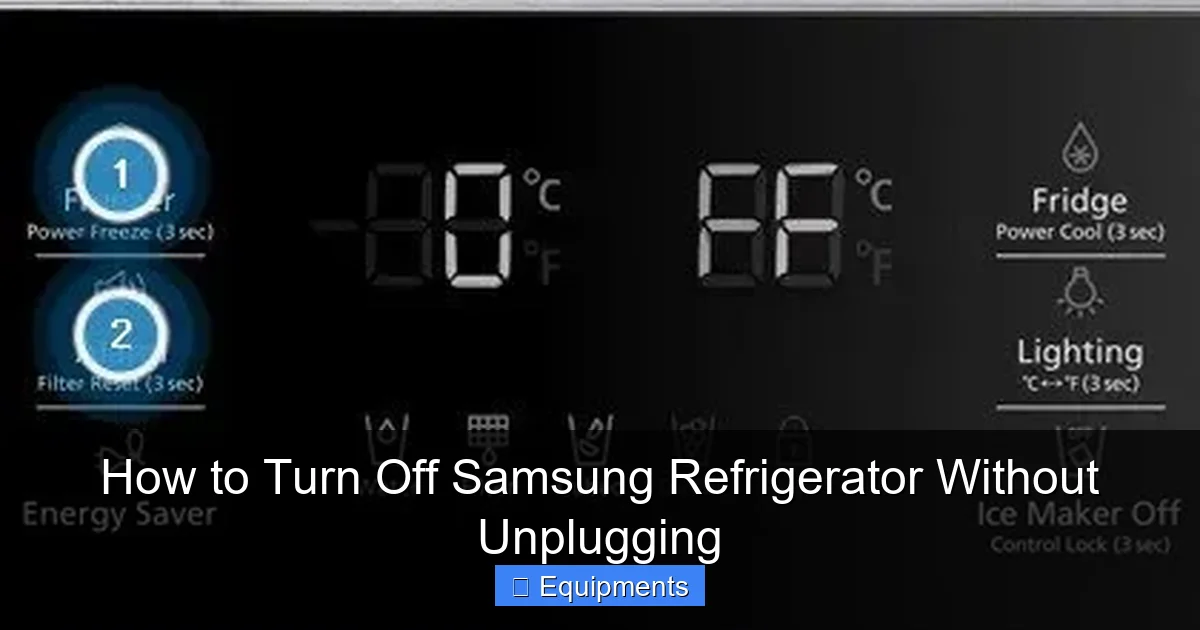
Visual guide about How to Turn Off Samsung Refrigerator Without Unplugging
Image source: refrigeratorblog.com
Step-by-Step for Most Digital Display Models (2015 and Newer)
This covers the vast majority of Samsung French Door, Side-by-Side, and Bespoke models with a digital temperature display and button panel on the front or inside.
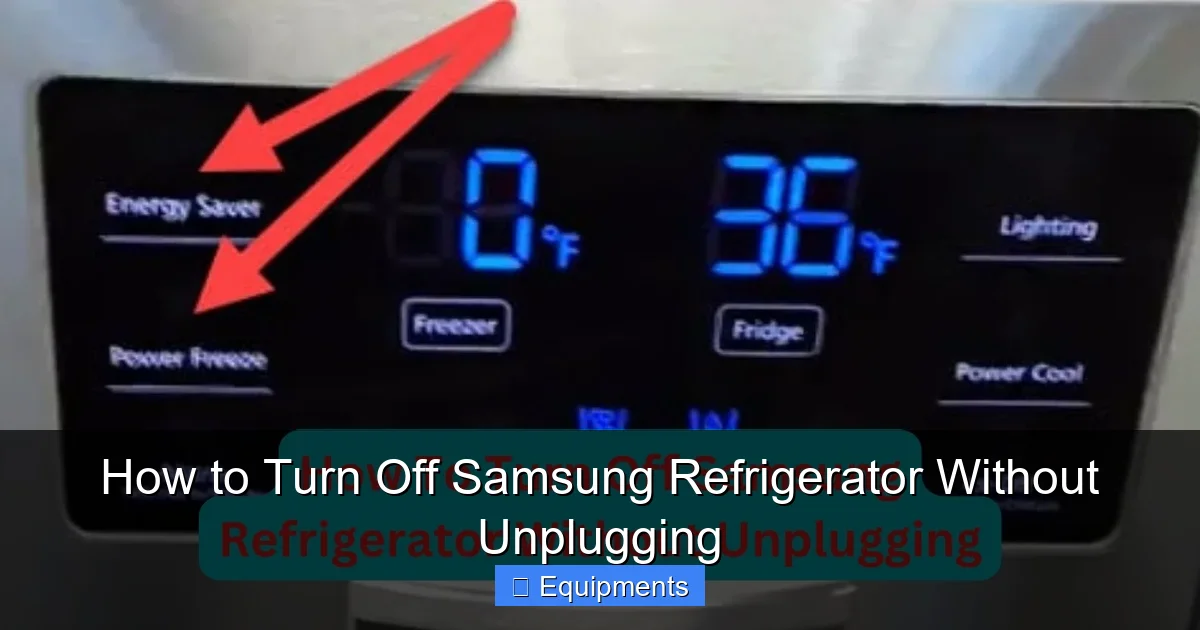
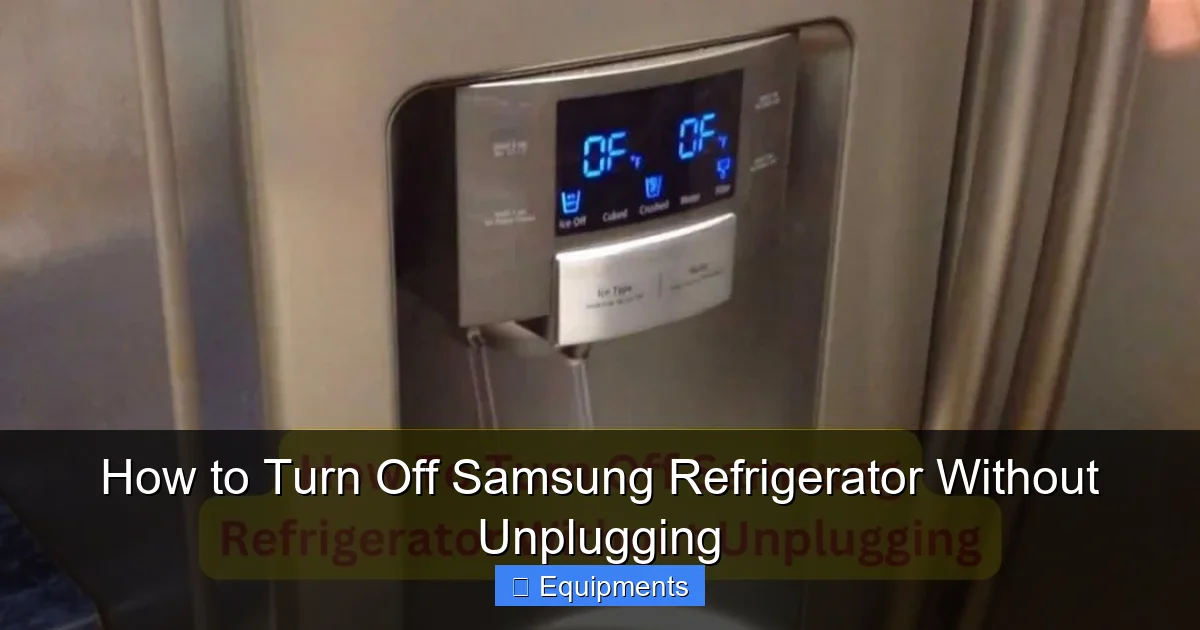
- Locate the Control Panel: This is typically on the front of the refrigerator door at the top, or inside on the control shelf. You’ll see buttons for “Fridge,” “Freezer,” and possibly icons for Ice, Water, or a gear/settings symbol.
- Identify the “Power” or “Cooling Off” Button: Look for a button labeled “Power,” “Cooling Off,” or an icon that looks like a snowflake with a line through it. On many newer models, you must enter a settings menu.
- The Common Sequence (The 3-Second Hold): The most frequent method is to press and hold the “Fridge” and “Freezer” buttons simultaneously for about 3 seconds. You should hear a chime, and the digital display may change. Some models will show “OF” (for Off) or “OP” on the display, indicating cooling is disabled. The interior light will still turn on when you open the door.
- Alternative Menu Path: On models with a “Settings” or gear icon, press it. Navigate using arrow buttons to find “Cooling Off,” “Power,” or “Sabbath Mode.” Select it and confirm. The display will indicate the change.
- Confirm It’s Off: Listen. After 5-10 minutes, you should no longer hear the faint hum of the compressor or the whoosh of air from the vents. The fans will be silent. The display may go dark or show only the time, depending on the model’s design.
For Models with a Simple Rotary or Mechanical Dial
Older Samsung models or some simpler lines use a dial thermostat inside the fridge compartment.
- Find the Temperature Control Dial: It’s usually a rotating knob with numbers (1-7 or 1-9) or “Colder”/”Colder” markings.
- Turn it to the “0” or “Off” Position: Rotate the dial fully clockwise until it stops, usually at a “0” or an “Off” marker. This physically breaks the electrical connection to the thermostat, stopping the cooling call.
- Important Note: This method is less precise than the digital one. The light will still work, but there is no confirmation chime or display message. Simply ensure the dial is not on any numbered setting.
What “Cooling Off” Actually Means (And Doesn’t Mean)
When you engage Cooling Off mode:
- YES: The compressor stops running. The evaporator fan (in the freezer) and the condenser fan (at the back/bottom) stop. No new cold air is produced. The fridge will slowly warm to ambient room temperature.
- YES: The control board, display, interior lights, water dispenser (if connected to a pressurized line), and ice maker *motor* remain powered. The ice maker will not cycle, but the feeler arm or sensor is still “awake.”
- NO: The power is NOT cut. The unit is still “on” in a standby sense. Do not assume you can now safely remove food for hours—the insulation is not magical. Food will spoil on the same timeline as if the compressor was broken.
- NO: It does not defrost the fridge. If you have heavy frost buildup, you must manually defrost by leaving doors open after disabling cooling, or use the dedicated defrost cycle (see next section).
Specialized Off Modes: Vacation, Sabbath, and Defrost
Samsung equips its refrigerators with specific modes for particular scenarios. Using the correct one is crucial for efficiency and safety.
Visual guide about How to Turn Off Samsung Refrigerator Without Unplugging
Image source: digitalcertainly.com
Vacation Mode (The Extended “Off”)
This is designed for when you’re away for a week or more. Its function varies slightly by model:
- In Most French Door Models: Vacation Mode disables cooling in the *fresh food compartment* (the fridge section) but keeps the freezer running. This saves significant energy while protecting frozen goods. The fridge section will warm to room temperature. You must empty it.
- In Some Models: It may disable all cooling, similar to the standard Cooling Off mode, but with additional energy-saving tweaks to the display and other components.
- How to Activate: Often found in the same settings menu as Cooling Off. It may be a separate button or a toggle. The user manual is essential here, as the consequences of getting it wrong (e.g., freezer thawing) are severe. Activate it only when the fridge is empty and clean.
Sabbath Mode (The Observant “Off”)
This is a religious accommodation feature. When activated, it disables all interior lights, fans, and audible alarms for a 96-hour period. Crucially, it does NOT disable the cooling system. The refrigerator continues to maintain temperature silently. It’s for observant Jews during Sabbath and holidays. Do not confuse this with turning the fridge off; it keeps everything cold. It’s activated via a long-press of a specific button (often the “Ice” or “Alarm” button) and is indicated by a small crescent moon icon on the display.
Forced Defrost Mode (The Manual Thaw)
If your goal in “turning off” the fridge is to manually defrost a frost-free model that has developed excessive ice (often due to a door seal issue or a failed component), you don’t use Cooling Off. You need to initiate a manual defrost cycle.
- Why Defrost Mode is Different: Cooling Off just stops the compressor. Defrost Mode actively turns on the defrost heater (a wire behind the freezer panel) to melt ice, while keeping the fans off so water can drain. It’s a specific diagnostic/service mode.
- How to Access (General Guidance – Consult Manual!): This is often a hidden service mode. A common sequence for many Samsung models is: Press and hold the “Energy Saver” (or “Power Freeze”) and “Light” buttons simultaneously for 10 seconds until the display changes. Then use the fridge temp up/down buttons to navigate to “Defrost” (often “Fd” or “dF”). Activate it. You’ll hear a click and the heater will activate. The cycle can last 20-30 minutes. After it finishes, the fridge may resume normal cooling or stay off until you exit the service mode.
- Warning: Only use defrost mode if you have a significant frost problem. Using it unnecessarily wastes energy and can cause water to pool if the drain is clogged.
What To Do After You’ve Turned Cooling Off
Disabling cooling is only the first step. What you do next depends entirely on why you turned it off.
Visual guide about How to Turn Off Samsung Refrigerator Without Unplugging
Image source: digitalcertainly.com
Scenario 1: Moving or Deep Cleaning
If you’re moving the fridge or giving the interior a thorough scrub:
- Empty Everything: Remove all food, shelves, bins, and the ice bucket.
- Defrost (If Frost-Free): If your freezer has frost buildup, now is the time. With cooling off and doors open, leave it for several hours or overnight. Place towels inside to catch meltwater.
- Clean: Use a mild solution of baking soda and warm water. Avoid harsh chemicals that can damage plastic or leave odors.
- Dry Thoroughly: Wipe all surfaces completely dry. Any leftover moisture will freeze into ice when you restart.
- Restarting: Once clean and dry, close all doors. Re-engage cooling via the control panel (you may need to repeat the “Cooling On” sequence, which is often the same button hold). Set your desired temperatures (recommended: 37°F/3°C for fridge, 0°F/-18°C for freezer). Wait 24 hours for temperatures to stabilize before adding food.
Scenario 2: Troubleshooting a Noise or Issue
Sometimes you want to stop the fridge to see if a noise (buzzing, gurgling) stops, indicating the source is the compressor or fans.
- Listen Actively: With cooling off, the fans and compressor should be silent. If the noise persists, it’s likely from the water inlet valve (for the dispenser/ice maker) or a loose panel.
- Check the Ice Maker: A jammed ice maker can make loud noises. With cooling off, you can safely remove the ice bucket and feel for any ice jams in the mold or feeler arm.
- Do Not Leave Off for Long: This is a diagnostic tool, not a solution. Once you identify the noise source, turn cooling back on and address the specific issue (leveling the fridge, clearing a jam, etc.).
Scenario 3: Extended Vacation or Storage
For absences longer than a month:
- Use Vacation Mode: As described, this is the energy-efficient setting for a long-term empty fridge.
- Fully Empty and Clean: Remove all food. Clean and dry the interior completely.
- Secure the Doors: Use a thick rubber band or a purpose-made fridge door holder to keep doors slightly ajar. This prevents stale air and mold/mildew from developing in the sealed, warm, humid interior.
- Unplug (Finally!): For storage periods exceeding 3-6 months, it is acceptable and advisable to unplug the refrigerator after it is clean, dry, and doors are propped. This eliminates all electrical draw and eliminates any risk of component failure during an empty period. When you return, plug it in, let it run empty for 24 hours, then restock.
Troubleshooting: What If the Control Panel Method Doesn’t Work?
You followed the manual’s instructions, pressed and held the buttons, but the compressor keeps humming. What now?
Confirm You’re in the Right Mode
Double-check the display. Does it show “OF,” “OP,” or a snowflake icon with a slash? On some models, the display might go blank or show only the time. If it still shows the temperature numbers, cooling is likely still active. Try the sequence again, holding for a full 5 seconds.
Perform a Master Reset (The Nuclear Option)
If the control panel is unresponsive or you suspect a software glitch, a full reset can restore function. This WILL erase all settings.
- Standard Reset Sequence: Unplug the refrigerator from the wall outlet OR turn off the dedicated circuit breaker. Wait exactly 5 minutes. This drains residual power from the control board’s capacitors. Plug it back in or turn the breaker on. The fridge will power up, run through a startup sequence (you’ll hear clicks and fans), and return to factory settings. You must now set your temperatures and wait for cooling to begin.
- Use This Only If: The Cooling Off command is ignored, the display is frozen, or you have persistent error codes. It’s a fix for the brain, not for mechanical problems like a bad compressor or sealed system leak.
When to Call for Service
If you cannot disable cooling, or if cooling won’t come back on after you’ve re-enabled it, there is a hardware issue. Possible culprits:
- Failed Main Control Board: The brain isn’t sending the signal to the compressor.
- Faulty Compressor Start Relay/Overload Protector: The compressor wants to start but a safety component is tripped or failed.
- Sealed System Problem (Leak/Blockage): The refrigerant can’t circulate. The compressor may run continuously without cooling, or not at all.
At this point, professional diagnosis is required. Document any error codes from the display before calling Samsung support or an authorized service technician.
Conclusion: Control, Not Chaos
Mastering the art of turning off your Samsung refrigerator without unplugging it is a simple yet powerful piece of appliance ownership knowledge. It puts you in control, protects your investment from unnecessary electrical stress, and saves you the frustration of resetting clocks and waiting for ice. Remember the golden rule: the control panel is your friend; the power cord is for emergencies only.
Always start by consulting your specific model’s user manual—the button locations and menu names are your definitive guide. Whether you’re using the standard Cooling Off mode for a party, Vacation Mode for a trip, or defrost mode for maintenance, you’re now equipped to do it safely and effectively. Treat your refrigerator with the same care you’d give your computer, and it will reward you with years of reliable, efficient service. And never forget the cardinal rule of food safety: when cooling is off, the clock is ticking on your perishables. Plan accordingly, and you’ll have nothing to worry about.
Frequently Asked Questions
Will turning off my Samsung fridge using the control panel spoil the food inside?
Yes, absolutely. Disabling the cooling system means the refrigerator will no longer maintain cold temperatures. Perishable food in the fridge section will begin to warm and spoil within 4-6 hours, depending on ambient temperature and how full the fridge is. The freezer will keep food frozen for a longer but still limited time (1-2 days if full and unopened). You should only disable cooling when the fridge is empty or you are prepared to consume or properly store all perishables immediately.
How long can I leave my Samsung refrigerator in Cooling Off mode?
Technically, you can leave it in Cooling Off mode indefinitely, as it’s just a setting on the powered control board. However, practically, it’s only suitable for short periods (a few hours to a day) for tasks like cleaning or moving, or for the specific purpose of using Vacation Mode for extended absences. Leaving it off for weeks with the doors closed will create a warm, humid environment that promotes mold, mildew, and unpleasant odors. For long-term storage, empty, clean, dry, and prop the doors ajar, and consider unplugging.
Is “Vacation Mode” the same as “Cooling Off” on my Samsung fridge?
No, they are different. Cooling Off typically disables all cooling—both fridge and freezer sections. Vacation Mode is designed to save energy when you’re away and usually disables cooling only in the fresh food (fridge) compartment while keeping the freezer running to protect frozen items. Always check your user manual to confirm which sections are affected by each setting on your specific model, as activating the wrong one could lead to a freezer full of thawed food.
My ice maker stopped working after I used Cooling Off. Is it broken?
Probably not. When you disable cooling, the ice maker motor is also powered down. It will not cycle to make or eject ice. When you re-enable cooling, the ice maker will need to go through its entire startup cycle: it must fill with water, freeze the water into a cube, and then eject. This process can take 6 to 12 hours after power/cooling is restored, depending on the freezer temperature. Be patient. If it doesn’t work after 24 hours of normal cooling, then troubleshoot the ice maker specifically.
My fridge shows an error code after I turned it off and on. How do I clear it?
Many Samsung error codes will clear automatically after the fridge runs normally for a period (often 1-2 hours). First, ensure all doors are closed tightly and the fridge/freezer temperatures are set correctly. If the code persists (common ones are “ER IF,” “ER FF,” or a flashing segment), you can often clear it by performing a master reset: unplug the fridge for 5 minutes, then plug it back in. If the code returns immediately, it indicates a persistent fault (like a failed sensor or fan motor) that needs professional service.
What’s the difference between turning off cooling and a power outage?
Functionally, the result is the same: the compressor stops. However, the cause matters to the refrigerator’s computer. A power outage is an unexpected, abrupt loss of power. When power returns, the fridge may run diagnostics and display an error code. Using the control panel to disable cooling is a planned, graceful shutdown command. The control board knows it was intentional and does not log it as an error. This is why using the panel method prevents the post-power-up error codes and confusion that a simple unplugging can cause.
