Setting Sabbath Mode on your GE oven is a simple process designed to accommodate religious observances by disabling automatic shut-off and certain electronic features. This guide provides detailed, model-specific instructions to activate and use this function correctly. You’ll learn exactly which buttons to press, what changes occur in your oven’s operation, and crucial safety tips to ensure proper use. Always consult your specific model’s manual, as button sequences can vary slightly between GE oven lines.
Have you ever looked at your GE oven’s control panel and wondered about the mysterious “Sabbath” symbol or setting? You’re not alone. Many GE oven owners, particularly those in Jewish communities, are familiar with the concept but unsure of the precise steps to engage it. Setting Sabbath Mode on a GE oven is a thoughtful feature that bridges modern technology with ancient tradition, allowing for cooking and food warming during the Sabbath (Shabbat) and certain Jewish holidays without violating religious laws that prohibit operating electrical devices. This comprehensive guide will walk you through everything you need to know, from the “why” behind the feature to the exact “how-to” for your specific GE model. We’ll break it down into simple, actionable steps, ensuring you can use this function confidently and correctly.
The core principle of Sabbath Mode is to disable the oven’s standard automatic shut-off timer (which typically turns the oven off after 12 or 24 hours) and to make the oven “ignore” brief power fluctuations, like those from a storm or utility work. In a traditional Sabbath observance, creating a new fire or adjusting an existing flame/heat source is prohibited. For an electric oven, this translates to not allowing the user to change settings via the digital buttons during the Sabbath. Therefore, the Sabbath Mode function is designed to be activated *before* the Sabbath begins. Once on, you can set a cook time and temperature, and the oven will maintain that heat without beeping at you, shutting down, or requiring any interaction. It’s a pre-set-and-forget solution that respects the day of rest.
However, navigating the activation process can be tricky because GE implements this feature differently across its various product lines—from the standard GE Profile series to the high-end Cafe and Monogram models. The button you hold, the sequence, and the indicator light all vary. That’s why this guide is structured to first help you identify your oven’s specific method and then provide the universal principles that apply. Whether you have a single wall oven, a double oven, or a range with a cooktop, the fundamental logic is the same. Let’s dive in and demystify this essential setting.
Key Takeaways
- Sabbath Mode disables the oven’s automatic shut-off timer and prevents the appliance from responding to momentary power interruptions, allowing for extended cooking periods during religious observance.
- Activation sequences differ by GE oven model series (Profile, Cafe, Monogram, etc.), typically involving holding the “Timer” or “Start/Stop” button for 5+ seconds until an indicator appears.
- In Sabbath Mode, the oven’s display and sounds are often disabled to avoid interaction, but manual temperature and time adjustments via knob or specific buttons remain possible on many models.
- This mode is intended solely for Sabbath/holiday observance and should not be used for routine cooking due to the lack of automatic safety shut-off features.
- Deactivation usually requires the same button-hold sequence used for activation, or simply allowing the oven to cool completely and power cycle.
- Always verify your specific model’s manual for the exact procedure and any model-specific limitations or warnings before use.
- Sabbath Mode does not override all safety features; extreme temperature protections and certain error codes will still function to prevent hazards.
📑 Table of Contents
- Understanding the “Why”: The Purpose and Function of Sabbath Mode
- Step-by-Step: How to Identify and Activate Sabbath Mode on Your GE Oven
- What Changes? Operating Your GE Oven in Sabbath Mode
- Deactivating Sabbath Mode: Ending the Cycle Safely
- Troubleshooting: Common Issues and Solutions
- Critical Safety Considerations and Best Practices
- Conclusion: Respecting Tradition with Modern Convenience
Understanding the “Why”: The Purpose and Function of Sabbath Mode
Before we tackle the “how,” it’s crucial to understand the “why.” Sabbath Mode isn’t just a quirky feature; it’s a carefully engineered solution to a specific religious requirement. In Jewish law (halacha), the Sabbath is a day of rest where creative work is prohibited. This includes activities categorized as “makeh bapatish” (the final hammer blow), which encompasses building or completing something. Operating an electric appliance, which involves completing an electrical circuit, is generally included in this prohibition. Furthermore, adjusting an oven’s temperature during the Sabbath is considered a form of “cooking” or “baking,” which is also forbidden.
The Technical Adaptation
Appliance manufacturers like GE worked with rabbinical authorities to design a mode that complies with these laws. Technically, Sabbath Mode does three primary things:
- Disables the 12/24-Hour Auto Shut-Off: Normally, for safety, ovens shut off after a set period. Sabbath Mode overrides this, allowing the oven to run for the entire Sabbath period (approximately 25 hours) without interruption.
- Prevents Response to Power Interruptions: A brief power flicker might cause a modern oven to reset and shut off, requiring manual restart—an action prohibited on Sabbath. Sabbath Mode makes the oven “remember” its state and continue as if nothing happened.
- Disables Audible and Visual Indicators: Beeps, chimes, and display changes that normally signal the end of a cycle or a timer are silenced. The display may also dim or go blank to avoid the temptation of reading and adjusting it.
It is not designed to allow you to change the temperature or cook time during the Sabbath. Those settings must be programmed before entering the Sabbath. The oven will then maintain the programmed temperature continuously. Some newer GE models with “Bake Sabbath” and “Broil Sabbath” as separate options offer more granular control, but the principle remains: set it and forget it.
Step-by-Step: How to Identify and Activate Sabbath Mode on Your GE Oven
This is the heart of the matter. Because GE has changed its control panel designs over the years, the activation method is not one-size-fits-all. You must first identify which control system your oven uses. Here’s your detective work plan.
Visual guide about How to Set Sabbath Mode on Ge Oven
Image source: thekitchenix.com
Step 1: Locate the Sabbath Symbol and Consult Your Manual
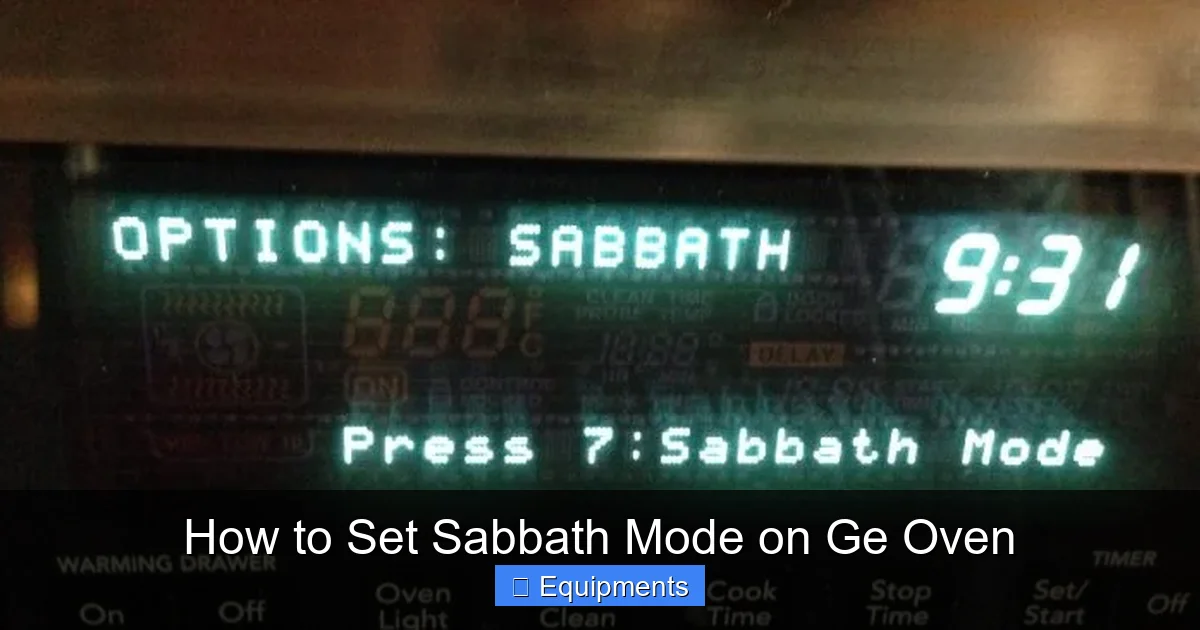
The easiest way is to look for the Sabbath symbol on your oven’s control panel. It’s usually a small icon that looks like two intertwined triangles (the Star of David) or sometimes just the word “SABBATH.” If you have the physical user manual, the index will have “Sabbath Mode” with the exact page and procedure. If you’ve lost it, don’t panic. GE manuals are available online. Go to the GE Appliances website, navigate to “Support” > “Owner’s Manuals & Guides,” and enter your oven’s exact model number (found on a sticker inside the oven door or on the back). Search the PDF for “sabbath.” This is your most reliable source.
Step 2: Common Activation Sequences by GE Series
Based on common GE models, here are the most frequent methods. Try these in order if you can’t find your manual immediately.
- For Many GE Profile® and Standard GE Models (Digital Keypad): Press and hold the Timer button (or sometimes the Start/Stop button) for approximately 5 to 10 seconds. You should see a “SABBATH” indicator light illuminate on the control panel or a “Sb” message appear on the display. The oven may beep once. Release the button. The oven is now in Sabbath Mode.
- For Models with a Dedicated “Sabbath” Button: Some newer or higher-end models have a button labeled “Sabbath” or with the symbol. Simply press this button to toggle the mode on. The indicator will light up.
- For GE Cafe™ and Some Double Wall Ovens: The sequence can be: Press Bake, then immediately press and hold the Timer button for 5 seconds. The “Sabbath” light should come on. Alternatively, it might be: Press and hold the Cook Time button for 5 seconds.
- For Models with a Rotating Knob (Select Dial): These are less common but exist. Often, you turn the knob to “Bake,” set the temperature, then press and hold the Enter or Start button for several seconds until the Sabbath light activates. The timer function may need to be set first.
Step 3: The Activation Ritual (The Universal Pattern)
Regardless of the button, the process follows a pattern: Set your desired bake/broil temperature and cook time first (if needed), then initiate the Sabbath Mode sequence. You cannot change the temperature after Sabbath Mode is on. Once activated, the oven will begin heating if a temperature was set, or it will remain idle but ready. The display might go blank or show only the set temperature without a time. Do not be alarmed; this is normal. The oven is now in a “do not disturb” state.
What Changes? Operating Your GE Oven in Sabbath Mode
Once that Sabbath light is glowing (or the display shows “Sb”), your oven’s behavior changes significantly. Knowing what you can and cannot do is vital for both practicality and religious compliance.
Visual guide about How to Set Sabbath Mode on Ge Oven
Image source: images.homedepot-static.com
What You CAN Do:
- Maintain a Set Temperature: The oven will continue to heat and cycle on/off to maintain the temperature you programmed before activation. This is perfect for keeping food warm or slow-cooking a roast.
- Use the Oven Light Manually (on some models): On many GE ovens, the interior oven light switch (usually a button on the control panel or the door frame) will still work. You can turn it on to check your food. However, on some stricter implementations, even the light may be disabled. Test this before the Sabbath begins.
- Use the Cooktop (if separate): Sabbath Mode only affects the oven compartment. Your gas or electric cooktop on the range is a separate appliance and is typically not affected by the oven’s Sabbath Mode. You would need to use separate Sabbath Mode features for the cooktop if your range has them (often called “Sabbath Mode for Cooktop” or similar).
- Open the Oven Door: This is allowed. The oven will not shut off or beep when you open the door. However, opening the door will cause heat loss and the oven will work harder to maintain temperature.
What You CANNOT Do:
- Change the Temperature: You cannot press the up/down arrows or turn a knob to adjust the heat. The set temperature is fixed.
- Change the Cook Time: If you set a cook time, you cannot modify it or cancel it early. The oven will run for the full programmed duration or indefinitely if no time was set.
- Use Any Other Oven Functions: Features like Delay Start, Convection Convert, Proof, Warm, etc., are typically locked out. You must set the oven to a standard Bake or Broil setting before activating Sabbath Mode.
- Respond to Beeps or Alerts: The oven will not signal the end of a cycle. If you set a cook time, it will simply stop heating when the time expires, without a beep. You must manually turn it off later (after Sabbath) by deactivating Sabbath Mode and then pressing Off.
- React to Power Outages: If the power goes out and comes back, the oven will resume its previous Sabbath Mode state without requiring you to press any buttons. This is the key safety feature for observance.
Deactivating Sabbath Mode: Ending the Cycle Safely
Knowing how to turn it off is just as important as turning it on. The deactivation process is usually symmetrical to the activation.
Visual guide about How to Set Sabbath Mode on Ge Oven
Image source: mobileimages.lowes.com
The Standard Deactivation Method
To exit Sabbath Mode, perform the exact same button-hold sequence you used to activate it. Press and hold the Timer (or Start/Stop, etc.) button for 5-10 seconds. The “SABBATH” indicator light should turn off, and the display should return to normal operation (showing the time of day, etc.). The oven will now respond normally to all controls.
What If That Doesn’t Work?
In some older models or if the control board is locked, the only way to exit Sabbath Mode may be to completely power down the oven. This means turning off the circuit breaker that supplies power to the oven for at least 30 seconds, then turning it back on. When the oven restarts, it should be in its default, non-Sabbath state. Important: If you do this, you will lose any programmed cook time and temperature. You will need to reset your oven for regular use.
After Deactivation
Once Sabbath Mode is off, you can use your oven normally. If you had set a bake cycle that was running, the oven will continue in that mode until you press the Off/Cancel button. Remember, the automatic shut-off timer is now back in effect. For safety, always ensure the oven is turned off after use, especially if you deactivated it via a circuit breaker and are unsure of its state.
Troubleshooting: Common Issues and Solutions
Even with clear instructions, things can go awry. Here’s how to handle the most common problems.
“I Followed the Steps, but the Sabbath Light Didn’t Come On.”
First, double-check your model’s exact procedure using the online manual. If you’re using the “hold Timer” method, ensure you are holding it for a full 5-10 seconds. Some models require you to first have the oven in a “Bake” or “Broil” mode (with a temperature set) before the hold sequence will work. Try setting a bake temperature first, then perform the hold. Also, ensure no other buttons are being pressed accidentally.
“The Oven Won’t Heat After I Activated Sabbath Mode.”
Remember: Sabbath Mode locks in the settings. If you activated it without first setting a temperature and mode (Bake/Broil), the oven will not start heating. You must cancel Sabbath Mode, set your desired mode and temperature, and then reactivate Sabbath Mode. Plan ahead: set your cook settings, then engage Sabbath Mode.
“My Oven’s Display is Blank, Is It Broken?”
A blank or very dim display is a normal feature of Sabbath Mode on many GE models. It’s designed to minimize interaction. The oven is likely still functioning. You can usually feel the heat radiating from the oven walls or hear the cooling fan running. If you are concerned, try deactivating Sabbath Mode. If the display returns to normal, it was working as intended.
“Can I Use the Timer or Delay Start with Sabbath Mode?”
No. These features are expressly disabled in Sabbath Mode because they require programming and interaction. The entire point is to pre-program everything before the Sabbath begins. If you need a delayed start, you must set the oven to turn on at a specific time using the Delay Start function before you activate Sabbath Mode. Once the oven actually begins its heating cycle, you can then activate Sabbath Mode to keep it running without the 12-hour shut-off.
Critical Safety Considerations and Best Practices
Using Sabbath Mode responsibly is paramount. It disables a key safety feature (the auto shut-off), so extra vigilance is required.
Never Use for Unattended Non-Sabbath Cooking
Sabbath Mode should be used exclusively for its intended religious purpose. Do not use it as a way to cook while you are out of the house for a regular meal. The lack of an automatic shut-off creates a significant fire risk if something goes wrong. Always supervise cooking, even in Sabbath Mode, if possible. Use it only when you are home and can monitor the oven periodically.
Understand the Thermal Limits
While Sabbath Mode keeps the oven on, it does not change the oven’s maximum temperature rating or its internal thermal safety cut-offs. These are hardwired safety features that will still engage if the oven overheats due to a malfunction. However, do not assume the oven is invincible. Do not use Sabbath Mode for extreme, days-long cooking projects that push the appliance to its limits.
Food Safety is Still Your Responsibility
The oven will maintain temperature, but it will not tell you when your food is done. You must use a meat thermometer to check internal temperatures for safety, especially with poultry and large cuts of meat. The absence of timers and beeps means you are solely responsible for tracking cook times manually.
Keep the Oven Clean and Maintained
Excessive food debris or grease buildup inside the oven is a fire hazard under any circumstances, but especially when the oven is running for an extended, unsupervised period. Ensure your oven is clean before using Sabbath Mode for a long cook.
Communicate with Your Household
Everyone in your home should know that the oven is in Sabbath Mode. Clearly label the control panel with a sticky note (to be removed before Sabbath) or have a family discussion. This prevents someone from accidentally trying to change settings, getting frustrated by non-responsive buttons, or mistakenly turning the oven off.
Conclusion: Respecting Tradition with Modern Convenience
Setting Sabbath Mode on your GE oven is a beautiful example of technology adapting to human need. It allows families to uphold a millennia-old tradition of rest and sanctity without sacrificing the ability to prepare and keep food warm. The key to successful use is preparation and knowledge. Always, always consult your specific model’s manual first—it is the ultimate authority. Practice activating and deactivating the mode before the Sabbath begins so you are comfortable with the process. Remember the core principle: set temperature and mode, then engage Sabbath Mode. Be mindful of the safety implications of the disabled auto shut-off and never use this feature for casual, unattended cooking. By following these guidelines, you can use your GE oven’s Sabbath Mode with confidence, peace of mind, and reverence for the day of rest.
Frequently Asked Questions
Will using Sabbath Mode damage my GE oven?
No. Sabbath Mode is a manufacturer-designed feature that safely overrides the standard 12-hour shut-off timer. It does not bypass any essential thermal safety cut-offs. Using it as intended for Sabbath observance will not harm the appliance.
Can I use the oven light while in Sabbath Mode?
On most GE models, yes. The manual oven light switch (usually a button on the control panel or door frame) typically remains functional. However, some stricter implementations may disable it. Test this before the Sabbath begins by activating the mode and trying the light switch.
Does Sabbath Mode work on the cooktop (stovetop) of my GE range?
No. The Sabbath Mode setting only affects the oven compartment. Your gas or electric cooktop is a separate system. Many GE ranges that offer Sabbath Mode for the oven also have a separate, distinct procedure for enabling a similar “Sabbath” feature on the cooktop burners. You must consult your manual for cooktop-specific instructions.
What happens if the power goes out during the Sabbath?
This is precisely what Sabbath Mode is designed for. If power is interrupted and then restored, your GE oven will resume its previous Sabbath Mode state—maintaining the set temperature—without requiring you to press any buttons. You do not need to reactivate it after a power outage.
Can I broil in Sabbath Mode?
Yes, on most models that support it. You can typically set the oven to Broil mode, set the temperature (usually high), and then activate Sabbath Mode. However, broiling is an intense, high-heat function. You should never leave broiling unattended for extended periods, even in Sabbath Mode, due to the increased fire risk from food splatter or grease.
My oven’s display is blank after activating Sabbath Mode. Is it on?
A blank or very dim display is normal for Sabbath Mode on many GE ovens. It’s a design feature to minimize interaction. To confirm it’s on, carefully feel for heat radiating from the oven walls or listen for the cooling fan. You can also try pressing the light switch to see if the interior light comes on. If you are unsure, deactivate the mode to check.