That persistent red “Clean” light on your Cuisinart coffee maker isn’t a defect—it’s a helpful reminder that your machine needs descaling. Resetting it is a simple process that confirms you’ve completed the cleaning cycle. This guide provides clear, model-specific instructions to turn off that light after you’ve descaled your brewer, ensuring your coffee tastes its best and your machine lasts longer.
There you are, ready for your morning cup of coffee, and there it is again—that little, judgmental red “Clean” light glowing steadily on your Cuisinart coffee maker’s control panel. It’s a familiar sight for many owners, and while it’s an incredibly useful feature, it can be confusing. You know you just cleaned it! Or do you? The big question often is: how do you make it go away? Resetting the red clean light on a Cuisinart coffee maker is not about tricking the machine; it’s the final, official step in a proper maintenance routine. This complete guide will walk you through everything, from understanding what that light truly means to the exact button combinations for your specific model, ensuring your brewer performs optimally for years to come.
Key Takeaways
- The red Clean light is a maintenance reminder: It illuminates after a set number of brew cycles to indicate mineral buildup from water, signaling it’s time for a descaling process.
- You must descale BEFORE you reset: The reset sequence will only work if you have first run a full descaling cycle with a proper descaling solution or a vinegar-water mix.
- Reset procedures vary slightly by model: While the core concept is the same (hold a button), the specific button and duration differ between Cuisinart’s DCC, CBC, and other series.
- Ignoring the light can damage your machine: Mineral scale insulates heating elements, reduces brewing temperature, clogs water lines, and can lead to premature failure.
- Use the right descaling solution: For best results and to protect internal components, use a commercial descaler labeled safe for coffee makers or a 1:1 white vinegar and water solution.
- The reset is a “confirmation” step: It tells the machine’s internal counter that the maintenance task has been completed, clearing the reminder until the next cycle count.
- If the light returns quickly, you may have a water quality issue: Very hard water may require more frequent descaling. Consider using filtered or bottled water to extend time between cleanings.
📑 Table of Contents
- Understanding the Red “Clean” Light: More Than Just a Reminder
- The Golden Rule: Descale First, Reset Second
- Step-by-Step Reset Procedures for Popular Cuisinart Models
- Troubleshooting: What If the Light Won’t Reset?
- Maintenance Beyond the Reset: Prolonging Your Machine’s Life
- Conclusion: A Simple Habit for Exceptional Coffee
Understanding the Red “Clean” Light: More Than Just a Reminder
Before we dive into button-pressing, it’s crucial to understand the “why.” That red light is part of your Cuisinart’s internal intelligence. Your tap water, no matter how clear it looks, contains dissolved minerals—primarily calcium and magnesium. As the water is heated and pumped through your machine’s internal tubing and heating chamber, these minerals precipitate out and form a hard, chalky deposit called limescale.
The Purpose of the Clean Indicator
Cuisinart engineers programmed the machine with a simple counter. Based on extensive testing, they determined that after a certain number of brew cycles (typically around 60-75 for many models), the average amount of scale buildup in a home with standard water hardness begins to impact performance. When that cycle count is reached, the red “Clean” light illuminates. It is not a fault code; it is a preventative maintenance alert. Ignoring it doesn’t mean your coffee maker will break immediately, but it will start to underperform. Brew temperatures will drop, water flow may slow, and you might notice an off-taste in your coffee. More critically, the scale acts as an insulator around the heating element, forcing it to work harder and wear out faster.
What the Light Is NOT
It’s important to dispel a common myth: the red clean light is almost never an indicator of a malfunction or a broken part. You do not need to contact customer service about it. It is a normal, expected part of the ownership experience for any coffee maker that heats water. Think of it like the “change oil” light in your car—it’s a scheduled service reminder based on usage, not a sign the engine is about to explode.
The Golden Rule: Descale First, Reset Second
This is the cardinal rule and the most common point of failure. You cannot, and will not, reset the red clean light on your Cuisinart coffee maker without first performing a complete descaling cycle. The machine’s internal computer has a flag that gets set when the clean cycle is initiated. That flag only gets cleared when the descaling process is completed successfully and the machine is powered through a specific sequence. If you just hold buttons without having run the descaling solution through the system, the light will not reset because the machine knows the task hasn’t been done. It’s a one-to-one relationship: complete cleaning = permission to reset.
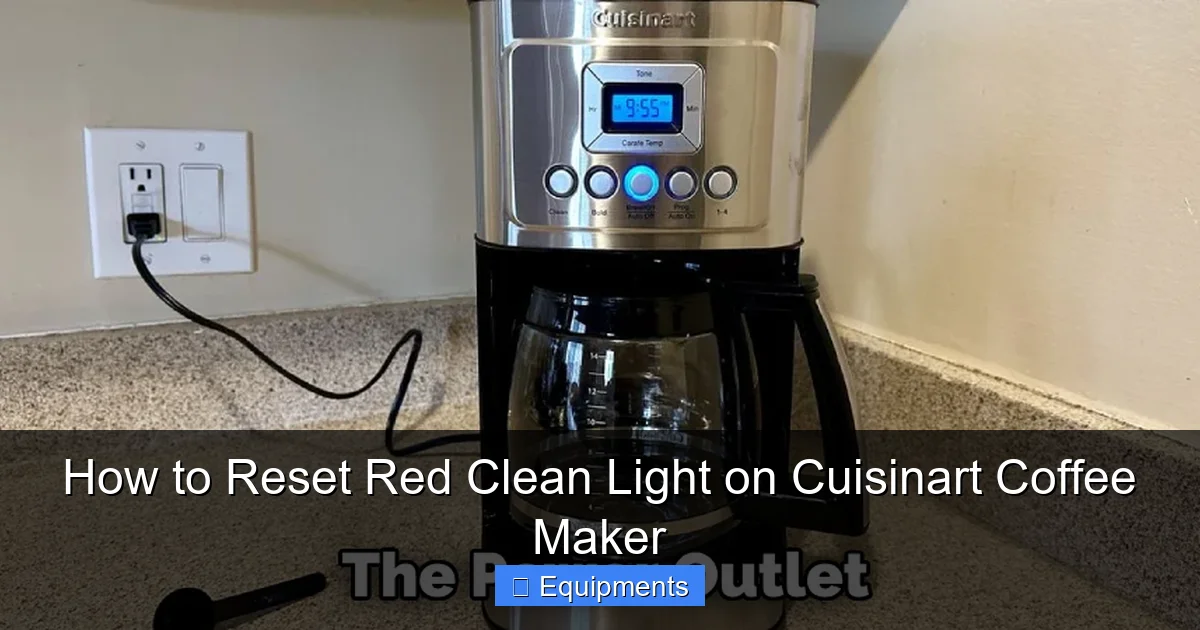
Visual guide about How to Reset Red Clean Light on Cuisinart Coffee Maker
Image source: thekitchenix.com
Choosing Your Descaling Agent
You have two primary, effective options:
- Commercial Descaler: Products like Durgol Swiss Espresso Descaler, Urnex Dezcal, or Cuisinart’s own branded cleaner are formulated to dissolve limescale quickly and safely without harming internal seals and metals. Always follow the dilution instructions on the bottle. This is the recommended, hassle-free method.
- White Vinegar Solution: A 1:1 mixture of plain white vinegar (not apple cider or cleaning vinegar) and fresh water is a highly effective, inexpensive alternative. Some models, particularly older ones, may have specific instructions to avoid vinegar due to its strong odor that can linger. Check your manual. For most, vinegar works perfectly.
Running the Descaling Cycle (General Process)
While exact steps vary, the general process is: 1) Empty the carafe and reservoir. 2) Fill the reservoir with your prepared descaling solution. 3) Place the carafe on the warming plate. 4) Initiate the “Clean” cycle. On most models, you press and hold the “Clean” button until the light starts blinking, then release. The machine will then pump the solution through its system in a slow, deliberate cycle that takes longer than a normal brew (often 30-45 minutes). It will stop and may beep when done. 5) Once complete, you must thoroughly flush the system by running 2-3 full brew cycles with fresh, clean water to rinse out any remaining descaling agent or vinegar taste.
Step-by-Step Reset Procedures for Popular Cuisinart Models
Now for the moment you’ve been waiting for. With the descaling cycle fully complete and the system rinsed, you can reset the light. Ensure the machine is plugged in and powered ON. The following are the most common reset sequences. If your model isn’t listed, the logic is similar—look for a “Clean” or “Brew/Power” button combination.

Visual guide about How to Reset Red Clean Light on Cuisinart Coffee Maker
Image source: thekitchenix.com
For Models with a Dedicated “Clean” Button (DCC-3200, DCC-3400, and many others)
This is the most straightforward and common design.
- With the coffee maker plugged in and turned ON (the red clean light should be on), press and hold the “Clean” button.
- Hold it for approximately 5-10 seconds. You should see the light begin to blink or change behavior. On some models, it will go off completely.
- Continue holding for another 2-3 seconds, then release.
- The red light should now be extinguished. If it remains on or starts blinking rapidly, try the sequence again, holding for a full 10 seconds.
For Models Without a Dedicated “Clean” Button (Some CBC-Series, older models)
These machines use a combination of the “On/Off” or “Brew” button.
- Ensure the machine is ON and the red clean light is illuminated.
- Press and hold the “On/Off” button (or sometimes the “Brew” button).
- Hold for 10-15 seconds. You may hear a beep or see the light flicker.
- Release the button. The red light should turn off. If it doesn’t, unplug the machine for 60 seconds, plug it back in, and try the sequence again on a powered-on machine.
The “Unplug and Replug” Universal Reset
If the button-hold method fails after you are absolutely certain descaling and rinsing are complete, perform this power cycle:
- Unplug the coffee maker from the wall outlet.
- Wait for 60 full seconds. This clears the machine’s volatile memory.
- Plug it back in.
- Power it on. In many cases, especially if the descale cycle was the last action before power-off, the clean light will have reset itself. If it remains on, you must repeat the descaling process—the machine likely didn’t register the completion of the first one.
Troubleshooting: What If the Light Won’t Reset?
You followed all the steps: you descaled, you rinsed, you held the button until your finger was sore, and that red light is still mocking you. Don’t panic. Here’s your diagnostic flowchart.

Visual guide about How to Reset Red Clean Light on Cuisinart Coffee Maker
Image source: thekitchenix.com
Scenario 1: The Light is Blinking Rapidly
A rapidly blinking red clean light (as opposed to a steady glow) on many newer Cuisinart models often indicates a different issue. It can signal that the water reservoir is not properly seated, there’s a problem with the carafe lid (if it has a sensor), or a more serious internal fault. First, remove and firmly re-seat the water reservoir. Ensure the carafe is on the warming plate and, if applicable, the lid is closed. Unplug and replug. If the rapid blinking persists, consult your specific model’s manual, as it may be an error code requiring customer service.
Scenario 2: The Light Returns Immediately After Reset
This means the machine did not properly register the completion of the descaling cycle. You likely did not run enough rinse cycles. Vinegar or descaler residue can trick the sensor. Run three full brew cycles with fresh, cold water only (no coffee) after your descaling. Then, attempt the reset sequence again. If it returns after a few brews, your water is extremely hard. You may need to descale more frequently or switch to bottled/filtered water.
Scenario 3: Nothing Happens When I Hold the Button
Double-check that you are holding the correct button. Refer to your model number (usually on the bottom) and search online for “[Your Model Number] clean light reset.” Ensure the machine is powered ON—some models won’t register a reset if they are in a standby state. Try the unplug/replug method to ensure the machine is in a true “on” state when you begin the reset hold.
Maintenance Beyond the Reset: Prolonging Your Machine’s Life
Resetting the light is the end goal, but the real victory is in the consistent maintenance that makes resets infrequent and effective.
Establish a Descaling Schedule Based on Your Water
Don’t wait for the light. The light is a worst-case-scenario reminder. If you have very hard water (you see scale in your kettle), plan to descale every 1-2 months. For average water hardness, every 3-6 months is a good proactive schedule. Using filtered or bottled water dramatically reduces scale buildup and can extend this to once a year or longer.
The Daily & Weekly Cleaning That Matters
Descaling addresses internal scale, but external cleanliness is vital too.
- After Every Use: Discard the used grounds and rinse the filter basket and carafe with warm, soapy water. Wipe the warming plate. Never immerse the machine’s base in water.
- Weekly: Deep clean the carafe, lid, and filter basket. Use a soft brush to clean the spray head (the part that distributes water over the grounds). Mineral deposits can clog the tiny holes here. A cotton swab dipped in vinegar works wonders.
- Monthly (or as needed): Wipe the entire exterior with a damp cloth. Check the water reservoir for any slimy biofilm (a sign of bacteria) and wash it with soapy water.
Using the Right Water from the Start
This is the single biggest piece of advice for long-term health. Do not use distilled water. It lacks minerals and can actually leach them from the machine’s metal components over time. Also, it’s tasteless. The best choices are filtered tap water (using a pitcher filter like Brita) or bottled spring water. These have a balanced mineral content that is good for coffee flavor but low enough in calcium to minimize scale. Avoid using hard, untreated tap water directly from the faucet day after day.
Conclusion: A Simple Habit for Exceptional Coffee
That little red light is your Cuisinart coffee maker’s way of talking to you. It’s not a complaint; it’s a request for a little care. By understanding that the reset is the final confirmation of a proper descaling cycle, you unlock the full potential of your machine. Remember the core sequence: Descale Thoroughly → Rinse Completely → Power On → Hold Clean Button (or On/Off) → Light Off. Incorporate a proactive maintenance schedule based on your local water quality, and you’ll be rewarded with consistently hot, flavorful coffee and a reliable brewer that will serve you for years. The next time that light comes on, you’ll know exactly what to do—and your morning routine will be all the better for it.
Frequently Asked Questions
Why is my Cuisinart coffee maker’s clean light flashing instead of staying solid?
A flashing red clean light typically indicates an issue other than the scheduled descaling reminder. First, ensure the water reservoir is seated correctly and the carafe is properly positioned on the warming plate. If the light continues to flash rapidly after checking these, unplug the machine for 60 seconds. If the problem persists, consult your specific model’s manual, as rapid flashing can signal a sensor error or internal fault requiring customer service.
Can I reset the clean light without using vinegar or a commercial descaler?
No. The clean light reset function is tied to the completion of a legitimate descaling cycle. The machine’s internal counter only clears if it detects that the descaling solution has been run through the full system. Simply holding the reset button without having first performed the descaling process will not work, as the machine knows the maintenance task hasn’t been completed.
How often should I really be descaling my Cuisinart, even if the light isn’t on?
Don’t wait solely for the light. Proactive maintenance is key. For areas with very hard water, descale every 1-2 months. For average water hardness, every 3-6 months is a good practice. Using filtered or bottled water can significantly extend this interval, potentially to once a year. The light is a safety net, but a schedule based on your water quality is more effective.
What happens if I just ignore the red clean light forever?
Ignoring the light leads to progressive scale buildup. This insulates the heating element, causing it to overwork, wear out faster, and fail prematurely. Scale clogs the tiny internal water tubes, reducing water flow and brew temperature, which results in weak, sour, or under-extracted coffee. Eventually, the machine may stop working altogether or require expensive repairs.
I just descaled and reset the light, but it came back on after two brews. What did I do wrong?
This almost always means you did not perform enough fresh water rinse cycles after descaling. Residual descaling solution or vinegar can trick the machine’s sensor into thinking scale is still present. After your descaling cycle finishes, run at least three full brew cycles with only fresh, clean water (no coffee) to thoroughly flush the system. Then attempt the reset sequence again.
Is the red clean light a sign that my coffee maker is broken?
Absolutely not. The red clean light is a standard, normal feature on all Cuisinart coffee makers with water heating capabilities. It is a programmed maintenance reminder based on brew cycles, not an error code or a sign of a defect. It signifies that routine descaling is due, which is a simple, user-performable task essential for the machine’s longevity and performance.