Tired of your PowerXL Air Fryer’s loud beeps? You can easily silence most models by pressing and holding the Start/Stop and Time buttons simultaneously for 3-5 seconds. This quick mute function stops the ready alerts and timer beeps, making it perfect for open-concept homes, night cooking, or quiet environments. Always consult your specific model’s manual first, as the exact combo may vary slightly between versions.
Key Takeaways
- Universal Mute Method: The most common way to turn off sound is by pressing and holding the Start/Stop and Time/Up buttons together for 3-5 seconds until you hear a confirmation beep or see a display change.
- Model Variations Exist: The exact button combination can differ slightly between PowerXL models (e.g., Vortex, Dual Basket). Your user manual is the final authority.
- Safety First: Muting sound means you won’t hear the “Food is Ready” alert. Always set a separate timer on your phone as a backup to prevent overcooking or burning.
- Re-enabling Sound is Simple: The process is usually reversible. Performing the same button press combo again typically restores the audio alerts.
- Not All Sounds are Muted: This function typically silences timer and completion beeps, but may not disable all error chimes or mechanical fan noise.
- Check for Firmware Updates: Some newer Wi-Fi-enabled PowerXL models might allow sound control through a companion app, offering more granular settings.
- No Physical Switch: There is no dedicated hardware “mute” switch; the control is entirely software-based via the button sequence.
📑 Table of Contents
- Introduction: The Quiet Revolution in Your Kitchen
- Understanding the Symphony of Sounds: What Your PowerXL Is Telling You
- The Standard Method: The Button Combo to Silence Your PowerXL
- Alternative Methods and Advanced Considerations
- The Critical Safety Protocol: Cooking Silently Without Risk
- Weighing the Pros and Cons: Is Muting Right for You?
- Beyond the Mute Button: Best Practices for Harmonious Air Fryer Ownership
- Conclusion: Taking Control of Your Kitchen’s Soundscape
Introduction: The Quiet Revolution in Your Kitchen
You’ve just unboxed your shiny new PowerXL Air Fryer. It promises crispy fries, juicy chicken, and decadent desserts with a fraction of the oil. You set it up, start your first batch of wings, and then… BEEP! BEEP! BEEP!
That familiar, insistent series of beeps is the air fryer’s way of talking to you. It’s a handy feature when you’re in the kitchen, but it can become a major nuisance. Maybe you have an open-floor plan where the sound travels into your living room during a movie night. Perhaps you’re a night owl chef, and those beeps risk waking up the household. Or maybe you just find the electronic chirping grating after a long day. Whatever your reason, you’re not alone in wondering, “How do I turn off the sound on my PowerXL Air Fryer?”
Good news: the mute function is built right into the appliance, though it’s not always obvious. It’s a hidden software feature, not a physical switch. This comprehensive guide will walk you through every method, explain why the sounds exist, and provide crucial safety tips for silent cooking. We’ll cover the standard button combo, model-specific quirks, troubleshooting, and even how to manage the mute setting responsibly. By the end, you’ll have complete control over your kitchen’s auditory environment.
Understanding the Symphony of Sounds: What Your PowerXL Is Telling You
Before we silence anything, it’s smart to understand what each sound means. Your PowerXL air fryer uses audio cues as a primary form of communication. Disabling them means you’re opting out of these alerts, so you must have an alternative system to stay safe and ensure perfect results.

Visual guide about How to Turn Off Sound on Powerxl Air Fryer
Image source: seeingdandy.com
The Three Key Audio Cues
1. The Start Confirmation Beep: A short, single chirp when you press the Start/Stop button. This confirms the machine has begun its cycle. It’s generally harmless to mute, as the visual display will also show it’s running.
2. The End-of-Cycle Alert: This is the most important and often loudest series of beeps (usually 3-5 rapid beeps). It signals that your cooking time is up and the heating element has shut off. This is the primary alert you’ll want to replace with a manual timer if you mute it.
3. The Error/Alert Beep: A different pattern, often a continuous or repeating single beep. This indicates a problem: the basket isn’t properly inserted, the unit is overheating, or there’s a malfunction. This sound is critical for safety and is often NOT muted by the standard mute function. You should never disable your ability to hear error alerts.
Additionally, you’ll hear the constant hum of the fan and the whir of the heating element. These are mechanical operational sounds and cannot be turned off; they are part of the cooking process.
The Standard Method: The Button Combo to Silence Your PowerXL
For the vast majority of PowerXL air fryer models—including popular ones like the PowerXL Vortex Air Fryer, PowerXL Dual Basket, and PowerXL Pro—the mute/unmute function is accessed via a simultaneous button press. This is a hidden “easter egg” in the firmware.
Visual guide about How to Turn Off Sound on Powerxl Air Fryer
Image source: fryerhouse.com
Step-by-Step Muting Instructions
Follow these steps precisely. The timing is key.
- Ensure the Air Fryer is Plugged In and Powered Off: The unit should be in standby mode (lights off, no display active), not actively cooking.
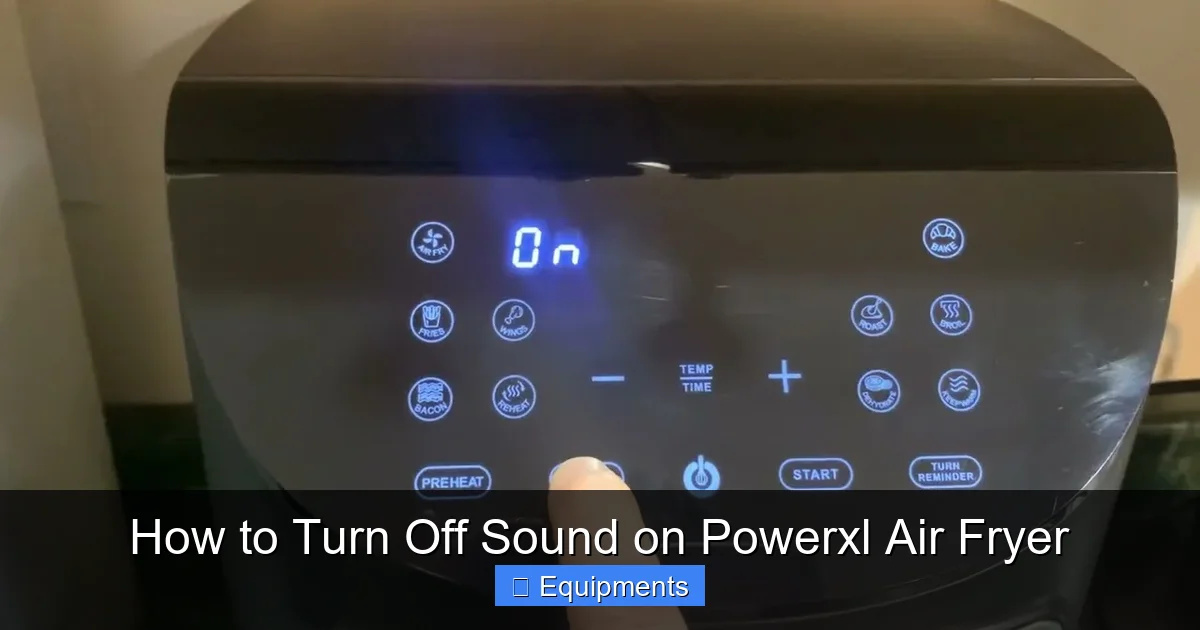
- Locate the Correct Buttons: You will need the Start/Stop button and the Time/Up (or sometimes Menu/Up) button. On dual-basket models, you may need to use the buttons for the specific basket you wish to mute.
- Press and Hold: Press and hold both buttons down at the same time.
- Wait for Confirmation: Hold for approximately 3-5 seconds. You should hear a faint double-beep or see a small icon (like a speaker with a slash through it) appear briefly on the digital display. This is your confirmation that the mute setting has been toggled.
- Release: Let go of the buttons. The unit will return to standby.
To test it: Set a short 1-minute cook cycle. If the mute is active, you will not hear the end-of-cycle beep. The display will still show “End” or turn off.
Important Model-Specific Notes
While the Start/Stop + Time combo is standard, slight variations exist:
- Older Models (Pre-2020): May require holding Start/Stop and the Power button, or Start/Stop and the Minus (-) button.
- Dual Basket Models: The mute setting is often per-basket. You must perform the button combo while that specific basket’s control panel is active (you may need to press the basket’s power button first to wake its controls).
- Models with Preset Buttons: Some use the Start/Stop and the Preset (e.g., Fry, Roast) button instead of Time.
Golden Rule: If the standard combo doesn’t work, your user manual is your best friend. Search the index for “sound,” “beep,” “mute,” or “alert.” If you’ve misplaced it, most PowerXL manuals are available as PDFs on the manufacturer’s website (PowerXLAppliance.com) by entering your model number, usually found on a sticker on the back or bottom of the unit.
Alternative Methods and Advanced Considerations
What if the standard button combo fails, or you want more control? Here are your other options, from troubleshooting to next-gen solutions.
Visual guide about How to Turn Off Sound on Powerxl Air Fryer
Image source: i.ytimg.com
Troubleshooting a Stubborn Mute Function
If holding the buttons does nothing, try this sequence:
- Power Cycle: Unplug the air fryer from the wall for a full 60 seconds. Plug it back in. The control board resets. Try the mute combo again.
- Factory Reset: Some models have a hidden factory reset. This is rare, but typically involves unplugging, holding a combination (like Start + Menu) while plugging back in, and releasing after lights flash. This will erase all custom settings. Only attempt if you find specific instructions for your model number online.
- Check for Lock Mode: If your child lock is engaged (often a padlock icon), it may prevent the mute function. Disengage the child lock first (usually by holding a dedicated Lock button or a combo).
The Smart App Route (For Wi-Fi Models)
Select newer PowerXL models (look for “Wi-Fi” or “Smart” on the unit) connect to the PowerXL App. If your model is compatible, this is the most flexible solution:
- Download the “PowerXL” app (by Sensata Technologies) and connect your air fryer.
- In the device settings or control interface, look for a “Sound” or “Notifications” toggle.
- This method may allow you to adjust volume levels or mute only specific alerts (like timer beeps but keep error sounds).
This is the future of appliance control, offering granular settings the physical buttons cannot.
When All Else Fails: The Workaround
If your specific model truly lacks a mute function (some very basic or older units might not have it), you have one foolproof, if inelegant, solution: physical sound dampening.
- Place the air fryer on a silicone mat or thick towel to absorb vibration.
- Keep the appliance in a cupboard or pantry during operation (ensure perfect ventilation—never block air intake/outtake vents).
- Use a separate, loud timer on your phone that you can hear over the fryer’s beeps, effectively ignoring them.
The Critical Safety Protocol: Cooking Silently Without Risk
Muting the ready alert is convenient, but it removes your primary auditory cue that cooking is complete. This introduces a risk of overcooking, drying out food, or in extreme cases, creating a fire hazard if left unattended for hours. Implementing a robust backup system is non-negotiable for safe silent cooking.
Your Non-Negotiable Backup Timer System
You must use an external timer. Here’s how to build a fail-safe system:
- Primary Timer: Use the timer on your smartphone or a dedicated kitchen timer. Set it for 1-2 minutes less than your air fryer’s programmed time. This gives you a buffer to check on the food.
- Secondary Timer: For long cooks (30+ minutes), set a second, final timer for the exact end time. This redundancy protects against accidentally dismissing the first alert.
- Visual Cues: Train yourself to glance at the air fryer’s display periodically. Many models show a countdown. When it hits zero, the display may change or flash.
- The Smell Test: Your nose is a great sensor. If you smell burning, immediately stop the appliance even if your timers haven’t gone off.
Never mute the sound and then leave the house or go to sleep with the air fryer running. The risk is simply too high. Silent cooking should only be done when you are present in the home and attentive.
Understanding What You CANNOT Mute
It’s vital to know the limits of the mute function. You should not—and often cannot—silence:
- Overheat Protection Beeps: If the internal temperature gets too high, a distinct, urgent beeping will sound. This is a safety feature that typically overrides the mute setting. Do not attempt to disable it.
- Basket Not Seated Alerts: A continuous beep will occur if the cooking basket isn’t properly clicked into place. This prevents the unit from operating. This alert is usually not muted.
- Error Code Beeps: A series of beeps paired with an error code (like E1, E2) on the display indicates a malfunction. This sound is critical for diagnostics.
If you mute your air fryer and then hear a new, persistent, or differently patterned beep, stop the appliance immediately, unplug it, and consult the troubleshooting section of your manual. Do not ignore it.
Weighing the Pros and Cons: Is Muting Right for You?
Let’s have a frank discussion about the trade-offs. Turning off the sound isn’t universally the best choice. Here’s a balanced look.
The Clear Advantages of a Silent Appliance
- Peace and Quiet: The most obvious benefit. No more startling beeps during baby naps, conference calls, or movie nights. It’s a courtesy to others in your home.
- Reduced Anxiety: For those with noise sensitivities, misophonia, or simply a low tolerance for repetitive electronic sounds, muting removes a constant irritant.
- Open-Concept Harmony: In loft-style apartments or homes where the kitchen is central, a silent appliance prevents noise pollution in living and sleeping areas.
- Discreet Operation: It makes your air fryer feel more like a seamless, integrated appliance rather than a gadget that announces its every action.
The Hidden Disadvantages and Risks
- Reliance on Memory: You must remember to set and monitor external timers. Humans are fallible; it’s easy to get distracted.
- Missed Readiness Cues: The beep is an unambiguous signal. Without it, you might check the display and misread it, or simply forget what you’re cooking.
- Potential for Food Waste: Overcooked, dried-out, or burnt food is not only unappetizing but a waste of money and ingredients.
- Safety Complacency: The convenience of muting might lead to riskier behavior, like starting a cook and leaving the house, because “it’s quiet so I’ll forget about it.” This is a dangerous mindset.
- Loss of Error Alerts: While most error sounds override mute, it’s a risk. If you’ve muted and the unit is behaving strangely, you might not be alerted audibly.
Our Recommendation: Mute your PowerXL air fryer if you are almost always present in the kitchen or nearby when it’s running, and you are diligent with phone timers. If you frequently multi-task away from the kitchen, keep the sound on for safety. Consider muting only for specific, short-cook items (like reheating pizza for 3 minutes) where you’ll be standing right there anyway.
Beyond the Mute Button: Best Practices for Harmonious Air Fryer Ownership
Silencing the beeps is one tool in your kit. To truly enjoy your PowerXL with minimal friction, adopt these broader habits.
Master Your Manual
We said it before, but it bears repeating. Your user manual is the ultimate source of truth for your specific serial number. It contains:
- The definitive mute instructions for your exact model.
- A complete list of all beep patterns and what they mean.
- Troubleshooting guides for when things go wrong.
- Cleaning and maintenance schedules to prevent issues that cause error beeps.
Bookmark the PDF or keep the physical copy in your kitchen drawer.
Embrace a Timer Ecosystem
Don’t rely on a single point of failure. Create a personal system:
- Air Fryer Timer: Use it for the primary cook time.
- Phone Timer 1 (Pre-Alert): Set for 80-90% of cook time to check doneness, shake the basket, or add seasoning.
- Phone Timer 2 (Final Alert): Set for 100% of cook time as your primary “get to the kitchen” signal.
- Smart Speaker Integration: If you have an Alexa or Google Home device, you can say, “Hey Google, set a timer for 12 minutes” while your hands are busy. This voice-activated timer is a game-changer.
Routine Maintenance Prevents Problems
Many error beeps are caused by poor maintenance. A simple weekly routine keeps your PowerXL happy and quiet:
- Clean the Heating Element Area: After the unit cools, use a soft brush (often included) to gently dislodge any food particles or oil splatter from the heating coil. Buildup can cause overheating alerts.
- Wipe the Interior and Exterior: Use a damp cloth. Avoid abrasive cleaners.
- Check the Basket and Tray: Ensure they are completely dry before inserting. Moisture can trigger sensor errors.
- Inspect the Ventilation: Make sure the rear or side vents are never blocked by curtains, cabinets, or walls. Poor airflow is a common cause of overheat beeps.
Conclusion: Taking Control of Your Kitchen’s Soundscape
Your PowerXL Air Fryer is a powerful, versatile tool designed to make cooking easier and healthier. Its beeps are meant to be helpful assistants, not annoying interruptions. By learning the hidden mute function—typically the Start/Stop + Time button hold—you reclaim authority over your kitchen’s auditory environment. You’ve now got the knowledge to toggle that setting on for quiet dinner prep or off for peace of mind during a busy cook.
Remember, the core principle is intentionality. Don’t mute blindly. Decide based on your schedule, your household, and your personal attentiveness. If you choose silence, build a fail-safe timer protocol and never compromise on safety. Keep your appliance clean and well-maintained to avoid unnecessary error beeps that no mute function can silence. Finally, always refer to your specific model’s manual—it’s the roadmap written by the engineers who built your appliance.
Now you can enjoy the crisp, golden results of your PowerXL Air Fryer on your own terms, whether that’s with a cheerful beep or in serene, silent efficiency. Happy (and quiet) cooking!
Frequently Asked Questions
Will turning off the sound affect my PowerXL Air Fryer’s cooking performance or warranty?
No. Muting the sound is a built-in software function and does not affect the heating elements, fan, or cooking algorithms. It will not void your warranty, as it’s an intended user feature, not a hardware modification.
Can I adjust the volume of the beeps instead of muting them completely?
For most PowerXL models, the mute function is binary—it’s either on or off. There is no intermediate volume control via the appliance buttons. The only exception is if your specific model is Wi-Fi-enabled and connected to the PowerXL app, which may offer a volume slider in its settings menu.
What should I do if the button combination to mute doesn’t work on my model?
First, try a full power cycle: unplug the air fryer for 60 seconds. Then, consult your user manual for the exact instructions for your model number. If you don’t have the manual, search online for “[Your PowerXL Model Number] mute beep.” If no solution is found, it’s possible your specific variant does not include a user-accessible mute function.
I muted my air fryer, but I still hear a constant humming or whirring noise. Is this normal?
Yes, absolutely. The mute function only silences the electronic beeps and chimes. The sound of the fan moving hot air and the heating element energizing are mechanical operational noises and are a normal, unavoidable part of the air frying process. These sounds cannot be turned off.
Is it safe to use the mute function for long cooking cycles, like roasting a whole chicken?
It can be done safely, but it requires extreme diligence. For long cooks (over 20 minutes), you must use at least two external timers (e.g., phone timers) and be present in your home. Never mute and then leave the house or go to bed. The risk of overcooking, drying out, or a fire hazard increases significantly without the audio alert.
How do I turn the sound back on after I’ve muted it?
Re-enabling the sound is usually as simple as repeating the mute process. With the air fryer in standby mode, press and hold the same button combination (most commonly Start/Stop + Time) for 3-5 seconds until you hear a confirmation beep or see a speaker icon appear/disappear on the display. If this doesn’t work, check your manual, as some models require a full power cycle after muting to reset.